
 EN
 BG

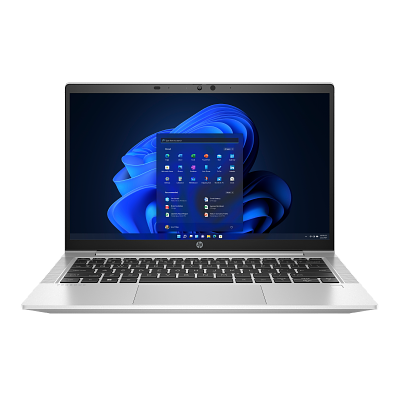
HP ProBook 635 Aero G8 The magnesium AMD business laptop with a sub-kilogram starting weight
The HP ProBook 635 Aero G8 is built around one number: a starting weight under one kilogram. A magnesium chassis and the AMD Cezanne (Zen 3) platform combine low weight with multi-core power in a 13.3-inch body you barely feel in the bag. As a refurbished laptop from ITR Bulgaria it comes verified, prepared and with a real warranty.
Benefits
Why the HP ProBook 635 Aero G8 is one of the more interesting ultralight business machines you can buy as a refurbished laptop
Starts under one kilogram
The magnesium chassis brings the starting weight down to around 0.99 kg. For someone carrying the laptop all day between meetings, that difference shows up on the shoulder well before lunch.
AMD Cezanne (Zen 3, 7nm)
The Ryzen 5000 platform with Radeon Vega graphics puts real multi-core power in the light body — enough for dozens of tabs, a few Excel files and a video call running at once.
SO-DIMM memory up to 32 GB
Two SO-DIMM slots, both user-accessible for upgrades to 32 GB DDR4-3200 — rare in a chassis this thin, where most ultralight rivals solder the RAM to the board.
Up to 53 Wh with HP Fast Charge
Fast charging brings it to up to 50% in about 30 minutes with the laptop off or in standby and a suitable charger of at least 65 W. Plug in over a coffee break and the laptop lasts to the next stop in a day spent on the move.
13.3″ FHD with thin bezels
An FHD IPS display at roughly 85% screen-to-body — a compact footprint with a full working area. The smaller body is the reason the machine fits almost anywhere.
HP Wolf Security for Business
HP Sure Start Gen6 (BIOS protection), Sure Sense, Sure Click and BIOSphere Gen6 — hardware-hardened security an IT team already knows how to manage.
USB-C 10 Gbps + USB-A + HDMI
USB-C 3.1 Gen 2 with DisplayPort and Power Delivery, two USB-A ports and HDMI. This model has no Thunderbolt — but a single USB-C handles an external monitor and charging.
720p camera with privacy shutter
A physical shutter closes the lens with a finger, and on select configurations an IR sensor enables face sign-in via Windows Hello. The mechanical cover over the lens does not rely on software.
MIL-STD-810H in a thin body
Magnesium gives strength without weight — the chassis passes MIL-STD-810H durability testing despite a 17.9 mm profile with 400- or 1000-nit displays, or 19.2 mm with the 250-nit display. A machine that takes daily travel without asking for careful handling.
Sensible value as a refurbished ProBook
As a used laptop that has passed a technical audit and refurbishment, the 635 Aero G8 puts an ultralight magnesium business body at a mainstream-class price — with a real warranty from ITR Bulgaria.
HP ProBook 635 Aero G8: the magnesium AMD ProBook with a sub-kilogram starting weight
There is a point where a laptop's weight stops being a spec line and becomes something you feel — usually around midday, when the bag on your shoulder is heavier than it was in the morning. The HP ProBook 635 Aero G8 is built against exactly that moment. A magnesium chassis brings the starting weight down to around 0.99 kg — under the psychological one-kilogram mark — which makes it the lightest AMD business laptop HP offered for its generation. Under that light body, though, sits AMD Cezanne (Zen 3, 7nm): a platform with genuine multi-core power, not a thinned-out compromise for the sake of the bag.
To understand why this model exists, it helps to know what a ProBook is. HP runs two parallel business lines: the EliteBook — the premium flagship with the full Wolf Security stack and Bang & Olufsen audio — and the ProBook, which brings serious business build and security at a lower price, aimed at small and medium businesses and at companies equipping staff in volume without inflating the budget. The 635 Aero is a curious twist on that logic: a ProBook that combines magnesium and aluminium, as already seen on the previous Aero G7. Magnesium weighs noticeably less than aluminium at the same strength — which is why the machine drops under a kilogram without flexing when you pick it up by one corner. A premium engineering choice dropped into a mainstream class, and that is what sets the 635 Aero apart from ordinary 13-inch business laptops.
The number the whole machine is built around is 990 — its grams on the scale. Until then only showcase flagships with generous price lists dipped under a kilogram; the Aero did it within the ProBook series, and without thinning the substance: a magnesium chassis, nineteen military-standard trials, two SO-DIMM slots — a rarity even in far pricier machines — and Ryzen cores of the then-current generation. Lightness stopped being a luxury and became simple engineering discipline. For the person with a bag on their shoulder all day, the difference counts every evening.
The platform is where the model surprises for its class. Ryzen 5000 on a 7nm process with Radeon Vega graphics handles parallel work calmly — dozens of tabs, a few Excel files and a video call at once, without the fan taking over the room. Memory is DDR4-3200 across two SO-DIMM slots, both user-accessible for upgrades to 32 GB — a real long-term reserve for a company that buys the machine once and runs it for years. Add to that a battery of up to 53 Wh depending on configuration with HP Fast Charge (up to 50% in about 30 minutes with the laptop off or in standby, using a suitable charger of at least 65 W), an optional 720p camera with a physical privacy shutter and an IR sensor for Windows Hello depending on configuration, and a 13.3-inch FHD IPS display that, on select configurations, comes with the integrated HP Sure View Reflect privacy panel for working with sensitive data in public.
On the open market, the closest platform rival is the Lenovo ThinkPad L13 Gen 2 (AMD) — also a 13.3-inch AMD business laptop from the mainstream class, but in a more conventional body; the 635 Aero stands apart precisely on the magnesium and the sub-kilogram starting weight on certain configurations. If your priority is maximum memory in the same size rather than low weight, the premium alternative is the HP EliteBook 835 G8 — a 13.3-inch EliteBook with up to 64 GB of RAM, which pays for that capacity in weight and price. And if you need touch and 360-degree hinges, the HP ProBook x360 435 G8 is the convertible option from the neighbouring line — a different build, around 1.5 kg, that gives up the very lightness the 635 Aero exists for.
The trade-offs are honest and come from the idea of an ultralight body itself. This model has no Thunderbolt — connectivity runs through USB-C 3.1 Gen 2 (10 Gbps) with DisplayPort and Power Delivery. There is no built-in RJ45 (wired networking is added via a USB-C adapter) and no SD card reader. For the user it was built for — a mobile consultant, a frequent traveller, a staffer carrying the machine all day — those are rarely deal-breakers. As a refurbished business laptop from ITR Bulgaria, the 635 Aero G8 is among the more interesting used laptops in the 13.3-inch class: an ultralight magnesium body and AMD power at a mainstream-segment price, verified through a technical audit and delivered with a real warranty.
Who it's for
Scenarios where the HP ProBook 635 Aero G8 makes the strongest sense
Frequent travellers packing light
Someone hopping between cities with carry-on only fits a sub-kilogram laptop and its charger in a side pocket — and saves every gram that would otherwise weigh on the shoulder between gates.
Mobile professionals out all day
For people who open and close the laptop ten times a day, low weight plus HP Fast Charge (up to 50% in about 30 minutes with the laptop off or in standby and a charger of at least 65 W) means less thinking about the grams and the outlet — the machine is ready when you are.
On-site consultants
A consultant presenting in a different office every day values the thin body on a cramped table — and, on configurations with Sure View Reflect, the option to dim the screen from a side glance in a waiting room or on a train.
Companies that value low weight when equipping staff
Businesses equipping mobile teams without paying EliteBook prices. The SO-DIMM upgrade path to 32 GB and standardised HP support make fleet servicing easier.
Model highlights
Magnesium chassis, starts under a kilogram
A starting weight of around 0.99 kg — the lightest AMD business laptop HP offered for its generation. The magnesium alloy gives strength without bulk; a profile of 17.9 mm with 400- or 1000-nit displays, or 19.2 mm with the 250-nit display, MIL-STD-810H.
AMD Ryzen 5000 / Cezanne (Zen 3, 7nm)
Up to eight cores with Radeon Vega graphics on a 7nm process. Multi-core power for parallel office work and video calls, packed into the light body.
2× SO-DIMM up to 32 GB DDR4-3200
Both slots are user-accessible for upgrades, with dual-channel support. Rare for a 13.3-inch chassis this thin — a real reserve for years of work ahead.
Battery up to 53 Wh + HP Fast Charge
A 3-cell battery with fast charging to up to 50% in about 30 minutes with the laptop off or in standby and a suitable charger of at least 65 W. A short top-up over a break covers the next leg of a day on site.
USB-C 10 Gbps + 2× USB-A + HDMI
USB-C 3.1 Gen 2 with DisplayPort and Power Delivery, two USB-A 3.2 ports and HDMI. This model has no Thunderbolt; wired networking via a USB-C adapter.
13.3″ FHD IPS — Sure View Reflect option
FHD IPS with thin bezels (around 85% screen-to-body). On select configurations, an integrated HP Sure View Reflect privacy panel at 1000 nits for sensitive work.
HP Wolf Security for Business
HP Sure Start Gen6 (BIOS protection and recovery), Sure Sense, Sure Click and BIOSphere Gen6, plus TPM 2.0 and an optional fingerprint reader.
A logical pick as a refurbished ProBook
Wi-Fi 5 or Wi-Fi 6 depending on configuration and an optional 4G LTE module for work outside the office. As a used laptop that has been refurbished, it ships with a real warranty and support from ITR Bulgaria.
Refurbished by ITR Bulgaria: what value do you get?
Buying a refurbished business-class laptop makes the strongest sense when the device has gone through a standardised internal refurbishment process and arrives with a real warranty. That is how used laptops become refurbished laptops — a practical, predictable and professional alternative to new entry-level machines, or a far more sensible purchase than new premium equivalents.
- ✓ Technical audit and cosmetic assessment of the device according to an internal standard
- ✓ Refurbishment, cleaning, quality improvement and configuration to standard for repeat business use
- ✓ Use of original software and a prepared configuration appropriate to the model
- ✓ Packaging, real warranty and ongoing support for the model from ITR Bulgaria
Ready to browse available units?
The HP ProBook 635 Aero G8 is a refurbished business laptop with an ultralight magnesium chassis and an AMD Ryzen 5000 platform — verified, prepared and delivered with a warranty from ITR Bulgaria. Browse current stock or get in touch for assistance.
Additional information
Where the HP ProBook 635 Aero G8 fits in the series ▼
The HP ProBook 635 Aero G8 is part of the ProBook 600 series — HP's mainstream business line. It sits below the premium EliteBook 800 series, aimed at small and medium businesses and at companies equipping staff without paying premium prices. Below the ProBook 600 sits the ProBook 400 (entry business); above it are the EliteBook 800 (premium) and the EliteBook x360 1000 / HP Elite Dragonfly (ultra-premium flagships).
Within the HP ProBook 600 G8 range, the standard size variants are the HP ProBook 630 G8 (13.3″), HP ProBook 640 G8 (14″) and HP ProBook 650 G8 (15.6″) — typically on an Intel platform and in a more conventional body. The HP ProBook 635 Aero G8 is the special ultralight variant: 13.3-inch, with AMD Ryzen 5000 and a chassis combining magnesium and aluminium. For comparison, the standard 13.3-inch HP ProBook 630 G8 is noticeably heavier than the Aero model at similar dimensions.
The HP ProBook 635 Aero G8 succeeds the HP ProBook 635 Aero G7 (AMD Ryzen 4000), carrying the same idea of an ultralight magnesium business laptop onto the newer Cezanne platform. The Aero line is where HP first brought a magnesium chassis into the ProBook range — a premium engineering choice moved into a mainstream class.
The HP ProBook 635 Aero G8 is not ideal if… ▼
- You need Thunderbolt or an external graphics card (eGPU) connected through it — this model has no Thunderbolt. Connectivity is via USB-C 3.1 Gen 2 with DisplayPort and Power Delivery. For Thunderbolt, look at an Intel-based EliteBook 800 model.
- You rely on built-in RJ45 Ethernet — the thin body has no full network port. Wired networking is added via a USB-C adapter. If a wired link is a daily habit, the thicker HP ProBook 640 G8 and 650 G8 with built-in RJ45 are more convenient; with an EliteBook, check the specific model.
- You expect an SD card reader — the 635 Aero has no SD card reader, confirmed on chassis teardown.
- You need more than 32 GB of RAM — memory tops out at 32 GB. For a 13.3-inch model with up to 64 GB, the direct alternative is the HP EliteBook 835 G8.
- You want touch / 2-in-1 / tablet mode — the 635 Aero is a clamshell laptop without 360-degree hinges. For a convertible from the neighbouring line, look at the HP ProBook x360 435 G8.
- You need discrete graphics for video editing, 3D or CAD — the model relies on integrated Radeon Vega. For that workload, look at the HP ZBook range.
- You expect a guaranteed specific configuration (a particular CPU, RAM, SSD, IR camera, Sure View Reflect panel or 4G LTE module) — these vary by unit, so it is worth checking the specific configuration.
Choosing the right size and form factor ▼
13.3-inch class (HP ProBook 635 Aero G8): the most compact and lightest choice in the ProBook 600 — for people who prioritise minimum bulk and weight in the bag. The magnesium chassis is the reason it starts under a kilogram on certain configurations. Trade-off: less working space than the 14- and 15-inch variants.
14-inch class (HP ProBook 640 G8): the balanced standard for most office users — more screen area and usually a built-in RJ45, but heavier and without the Aero's magnesium body.
15.6-inch class (HP ProBook 650 G8): more screen for spreadsheets and multi-window work. Better suited to mostly desk-based use or infrequent carrying.
Convertible form factor (HP ProBook x360 435 G8): a different build — 360-degree hinges, touch screen and tablet mode, around 1.5 kg. Choose it only if you genuinely need touch; otherwise the 635 Aero wins on weight.
Construction: the 635 Aero uses magnesium alongside aluminium — magnesium weighs less at the same strength. A profile of 17.9 mm with the 400- and 1000-nit displays, or 19.2 mm with the 250-nit one and MIL-STD-810H durability testing. A machine that takes daily travel without asking for careful handling.
Alternative models ▼
Within HP:
HP ProBook 635 Aero G7 — the previous generation with the same ultralight magnesium idea, but on AMD Ryzen 4000. A more affordable refurbished option. Trade-off: an older platform than the G8's Cezanne.
HP ProBook 630 G8 — the standard 13.3-inch HP ProBook 600, usually on an Intel platform. A more conventional body and noticeably heavier than the Aero model. A fit if low weight is not the priority.
HP EliteBook 835 G8 — the premium 13.3-inch HP EliteBook with AMD, up to 64 GB of RAM and the full Wolf Security stack. A higher class and more capacity, but it pays for that in weight and price.
HP ProBook x360 435 G8 — the convertible from the neighbouring line (touch, 360-degree hinges, around 1.5 kg). A different build for a user who wants tablet mode — but without the Aero's lightness.
Cross-brand alternative (13.3″, AMD, mainstream business):
Lenovo ThinkPad L13 Gen 2 (AMD) — the closest platform rival: also a 13.3-inch AMD business laptop from the mainstream class, with the classic Lenovo ThinkPad keyboard and TrackPoint. A more conventional body; the 635 Aero stands apart precisely on the magnesium and the sub-kilogram starting weight on certain configurations.
Note: do not compare the HP ProBook 635 Aero G8 with premium HP EliteBook 800 models or ultra-premium flagships like the HP Elite Dragonfly — they belong to a different price class and target group.
Refurbished by ITR Bulgaria: what value do you get? ▼
With the HP ProBook 635 Aero G8, refurbishment has a specific advantage that comes from the build itself: both SO-DIMM slots are user-accessible for upgrades, and the M.2 NVMe SSD is replaceable. That makes the technical audit and any memory or storage upgrade easier than on ultralight machines with soldered memory.
Add to that standardised HP support — long-running BIOS and driver updates, and readily available original chargers and accessories. After it has been through refurbishment, the model is prepared for repeat business use and arrives with a real warranty and support from ITR Bulgaria. That is how a used laptop becomes a verified refurbished business laptop with predictable value for the company.
Frequently asked questions ▼
Is the HP ProBook 635 Aero G8 a good choice as a used laptop?
Yes, if low weight is a priority. The 635 Aero is one of the few sub-kilogram business laptops with a magnesium chassis and an AMD multi-core platform. As a refurbished laptop it gives access to an ultralight business body at a mainstream-class price, with a real warranty — a good combination for frequent travellers and mobile teams.
What is the difference between the HP ProBook 635 Aero G8 and the G7?
The idea is the same — an ultralight magnesium body with a starting weight under a kilogram on certain configurations — but the platform is newer. The G8 uses AMD Ryzen 5000 / Cezanne (Zen 3, 7nm), while the G7 runs Ryzen 4000. The chassis, weight and overall concept stay close; the G8 is the more current generation in the same line.
What is the difference between the HP ProBook 635 Aero G8 and the HP EliteBook 835 G8?
The 635 Aero is a mainstream ProBook focused on minimum weight. The HP EliteBook 835 G8 is a premium 13.3-inch model with up to 64 GB of RAM and a fuller set of business features, but it is heavier and more expensive. The choice is between minimum weight (635 Aero) and maximum capacity / premium class (HP EliteBook 835 G8).
Does it have built-in Ethernet and Thunderbolt?
No — the model has neither built-in RJ45 Ethernet nor Thunderbolt. Connectivity is via USB-C 3.1 Gen 2 with DisplayPort and Power Delivery. There is also no built-in RJ45, due to the thin body; wired networking is added via a USB-C adapter. For wireless work there is Wi-Fi 5 or Wi-Fi 6 depending on configuration and an optional 4G LTE module.
What configurations does the HP ProBook 635 Aero G8 come in?
The model is found with AMD Ryzen 5000 processors (Ryzen 3 5400U, Ryzen 5 5600U, Ryzen 7 5800U, Ryzen 5 PRO 5650U or Ryzen 7 PRO 5850U), RAM up to 32 GB DDR4-3200 across two SO-DIMM slots, and an M.2 NVMe SSD. On select units the following may be available: an IR camera for Windows Hello, a fingerprint reader, an integrated HP Sure View Reflect privacy panel (1000 nits), a 4G LTE WWAN module or NFC. It is worth checking the specific unit.