
 EN
 BG

Lenovo ThinkPad L15 Gen 1 (Intel) The 15.6″ mainstream workhorse of the ThinkPad L series
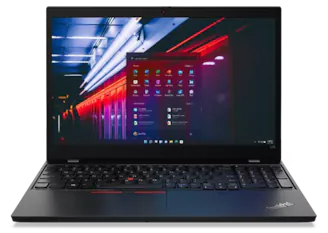
The Lenovo ThinkPad L15 Gen 1 (Intel) is the 15.6-inch mainstream ThinkPad — a full keyboard with a numeric keypad and the red TrackPoint, ThinkShield security, and two genuine SO-DIMM memory slots. As a refurbished business laptop from ITR Bulgaria, it is built for the standard office, where a large screen, a NumPad, and ThinkPad ergonomics do more work than a few grams saved.
Benefits
Why the 15.6-inch Lenovo ThinkPad L15 Gen 1 (Intel) is a sound choice as a refurbished business laptop for standard office work
Two genuine SO-DIMM slots up to 64 GB
No soldered memory — both slots are open for DDR4-2666 up to a total of 64 GB. For a company that buys once and expands two years later, that is a real reserve most ultrathin models no longer offer.
Full keyboard with NumPad + TrackPoint
The 15.6-inch body fits a numeric keypad next to the ThinkPad keyboard and the red TrackPoint. Numbers go in with the right hand, navigation stays in the middle of the keyboard — a combination that is rare in one chassis.
ThinkPad keyboard with 1.5 mm travel
A spill-resistant keyboard with optional backlighting and 1.5 mm travel — the standard for the mainstream L series (the Lenovo ThinkPad T14/T15 of the same era keep 1.8 mm). Comfortable for people who type and enter data all day.
MIL-STD-810G across 12 procedures
The chassis passes military tests for vibration, shock, temperature, and humidity across 12 procedures — durability built into the L series even in its more affordable class.
ThinkShield + ThinkShutter
TPM 2.0, discrete or firmware depending on the version and disabled in some regions, an optional fingerprint reader on the palm rest, and an optional IR camera for Windows Hello. On units with a camera, the physical ThinkShutter closes the lens with a finger.
Full RJ45 + two USB-C ports + HDMI
A full-size Ethernet port for offices on wired networks, USB-C for single-cable docking with a compatible dock, and HDMI for an external monitor — a practical set for a fixed workplace.
45 Wh with Rapid Charge
Lenovo Rapid Charge returns up to 80% in about an hour with the laptop off and a 65 W USB-C charger — a short lunch break covers the rest of the working day.
PC+ABS lid and base
The metal lid protects the screen through daily opening, while the polymer composite base brings the price down without making the chassis fragile — a deliberate L-series balance.
Up to 4-core Core i7 with vPro option
The Intel Comet Lake-U platform reaches a quad-core Core i7 in the top configurations, and the vPro options give IT central management of the fleet.
Value as a refurbished laptop
As a used business laptop from the ThinkPad L series, the Lenovo ThinkPad L15 Gen 1 (Intel) gives you a 15.6-inch chassis, a full keyboard, and real upgrade headroom at a more sensible price than a new entry-level model in the same class.
Lenovo ThinkPad L15 Gen 1 (Intel): the first L15 — a 15.6″ mainstream ThinkPad
The ThinkPad L series follows a simple layout by size: the Lenovo ThinkPad L13 Gen 1 (Intel) is the 13.3-inch mainstream model, the L14 the 14-inch, and the L15 the 15.6-inch. The L15 Gen 1 is the first generation under this new numerology. Its predecessor is the Lenovo ThinkPad L590, and earlier in the line came the L580 — Lenovo simply replaced the long-running "size plus generation" scheme (L490, L590) with the cleaner L14/L15, in step with the T14, T15, and X13 of the same year. The roots of that logic go all the way back to IBM: before the two-digit names, the same ThinkPad was sold as a 14-inch and a 15-inch variant under one name, which confused buyers. The number in the name has long meant one thing — screen size.
The L series is the affordable mainstream line of the ThinkPad family — a step above the entry E series and below the premium T series. This is not a machine you will see on a magazine cover; it was built for corporate, government, and education fleets, where laptops are bought in volume and used for years. Its logic is concrete: it offers the same business features as the pricier T series — a Smart Card reader, docking, ThinkShield security — but in a thicker chassis with a polymer composite base instead of full metal, at a lower price. The L15 Gen 1 carries that idea into a 15.6-inch format. The large screen and the full keyboard with a numeric keypad are why the model makes sense for an accountant who keeps three Excel files open all day — numbers go in with the right hand on the NumPad, while navigation runs through the red TrackPoint, without the hand leaving the middle of the keyboard.
The platform is 10th-generation Intel Core (Comet Lake-U) — up to a quad-core Core i7 in the top configurations, with vPro options for central IT management. Graphics are integrated Intel UHD, with an optional discrete AMD Radeon 625 with 2 GB GDDR5 on certain units outside EMEA. The real strength of this chassis, though, is memory: two genuine SO-DIMM slots, no soldered modules, up to 64 GB DDR4 at 2666 MHz with Intel Core and 2400 MHz with Celeron — a real reserve for a company that buys once and expands later. Add an M.2 NVMe SSD slot (up to 1 TB), a full-size RJ45 Ethernet port for offices still running on wired networks, USB-C for single-cable docking with a compatible dock, and HDMI. A 45 Wh battery with Lenovo Rapid Charge returns up to 80% in about an hour with the laptop off and a 65 W USB-C charger. On the better configurations the display is a 15.6″ FHD IPS panel with an anti-glare finish — 250 nits without touch or 300 nits with touch — matte, with no harsh reflections when you work next to a window (more basic units ship with an HD panel, so the specific configuration matters).
The build follows the usual L-series combination: an aluminium lid over a polymer composite base. It is a deliberate trade-off — the metal lid keeps the screen steady through daily opening and closing, while the composite base lowers the price without making the chassis fragile. The whole machine goes through MIL-STD-810G testing across 12 procedures for vibration, shock, temperature, and humidity. Security is the standard ThinkShield framework: dTPM 2.0 or firmware TPM 2.0 depending on the version, an optional fingerprint reader on the palm rest, an optional IR camera for Windows Hello, and the physical ThinkShutter — the small sliding cover that closes the lens with a finger when the camera is not in use.
Reviewers singled out one specific trait of this model: it arrives “loaded with security” in a way unusual for its price. The physical camera shutter, the discrete dTPM chip for cryptographic keys, the optional smartcard reader with which stricter organizations lock down access — all things that normally appear two classes higher. Lenovo's logic is pragmatic: the most affordable corporate machine is bought in volume and lands with all kinds of people, so the protections must not be optional. Security by default — the quiet virtue of a good working tool.
As a refurbished business laptop from ITR Bulgaria, the Lenovo ThinkPad L15 Gen 1 (Intel) has a clear rationale. The L series is designed for a long corporate lifecycle and standardised components, which keeps the technical audit and refurbishment clear in scope and outcome. For a company looking for a used business laptop to equip employees, a 15.6-inch ThinkPad with a full keyboard and real upgrade headroom is a more sensible buy than a new budget model in the same price band — more chassis, more serious security, and a brand that IT departments know. Used laptops from the L series hold a good reputation precisely because the machine is assembled for a second life, not a single lifecycle.
The honest trade-off is weight. At around 1.98 kg depending on configuration, the Lenovo ThinkPad L15 Gen 1 (Intel) is standard for the 15.6-inch mainstream class, but it is not light. The HP ProBook 650 G7 from the same period starts at 2.18 kg with an aluminium lid over a polymer base and also has a NumPad, but no TrackPoint — different ergonomics for people who work with the touchpad only. The Dell Latitude 5510 is lighter (from 1.82 kg), with aluminium and battery options up to 68 Wh, but again without the red dot in the middle of the keyboard. For a more current platform, the Lenovo ThinkPad L15 Gen 2 brings Intel Tiger Lake with Iris Xe graphics; the L15 Gen 1 stays on Comet Lake, which makes it the more affordable refurbished entry point into the 15.6-inch ThinkPad. And if weight is your priority, a 14-inch ThinkPad is the more logical pick — but then you lose the numeric keypad and some screen area.
Who it is for
Scenarios where the Lenovo ThinkPad L15 Gen 1 (Intel) makes the most sense
Accountants and spreadsheet users
An accountant entering figures and invoices all day benefits from the numeric keypad at the right hand and the TrackPoint in the middle of the keyboard — no moving the hand between typing and navigation.
Corporate fleets on a ThinkPad standard
An organisation that equips employees in volume and already runs on ThinkPad. The L15 Gen 1 fits existing docks, images, and procedures without overturning the department's standard.
Office staff who want the ThinkPad layout
A worker at a fixed desk who prefers the ThinkPad keyboard and TrackPoint, but wants a large 15.6-inch screen for documents and two window panes side by side.
IT teams that prioritise ThinkShield
An IT department that wants dTPM 2.0, an optional fingerprint reader, and a physical ThinkShutter, but in the larger 15.6-inch format — for roles where screen area matters more than minimal weight.
Model highlights
2× SO-DIMM up to 64 GB DDR4 (up to 2666 MHz)
Two open slots, no soldered memory — both can be swapped or expanded after purchase. A real upgrade reserve, rare in thinner modern machines.
Full keyboard with NumPad + TrackPoint
A ThinkPad keyboard with optional backlighting, a numeric keypad and the red TrackPoint in one 15.6-inch body — spill-resistant, with 1.5 mm travel for the mainstream L series.
Intel Comet Lake-U (up to 4-core i7 + vPro option)
10th-generation Intel Core up to a quad-core i7 with vPro options. Integrated UHD graphics and an optional discrete AMD Radeon 625 with 2 GB GDDR5 on certain units outside EMEA.
15.6″ FHD IPS anti-glare — 250 nits or 300 nits with touch
A matte IPS panel on the better configurations — comfortable for long work with documents and spreadsheets. Resolution and brightness vary by unit (an HD entry panel exists).
ThinkShield + ThinkShutter + dTPM 2.0
Business security: versions with dTPM 2.0 or firmware TPM 2.0 (TPM is disabled in some regions), a physical ThinkShutter on units with a camera, an optional fingerprint reader on the palm rest, and an optional IR camera and Smart Card reader.
Full RJ45 + two USB-C ports + HDMI
A full-size Ethernet port for wired networks, USB-C for single-cable docking with a compatible dock, and HDMI for an external monitor — a practical set for desk-based work.
MIL-STD-810G + 45 Wh Rapid Charge
A chassis tested across 12 MIL-STD-810G procedures, plus a 45 Wh battery with Lenovo Rapid Charge — up to 80% in about an hour with the laptop off and a 65 W USB-C charger.
A sound choice as a refurbished laptop
The L series is assembled for a long lifecycle and standardised components. That positions the Lenovo ThinkPad L15 Gen 1 (Intel) well as a used laptop that has gone through refurbishment and a technical audit.
Refurbished by ITR Bulgaria: what value do you get?
Buying a refurbished business-class laptop makes the strongest sense when the device has gone through a standardised internal refurbishment process and arrives with a real warranty. That is how used laptops become refurbished laptops — a practical, predictable and professional alternative to new entry-level machines, or a far more sensible purchase than new premium equivalents.
- ✓ Technical audit and cosmetic assessment of the device according to an internal standard
- ✓ Refurbishment, cleaning, quality improvement and configuration to standard for repeat business use
- ✓ Use of original software and a prepared configuration appropriate to the model
- ✓ Packaging, real warranty and ongoing support for the model from ITR Bulgaria
Ready to browse available units?
The Lenovo ThinkPad L15 Gen 1 (Intel) is a refurbished business laptop from the ThinkPad L series — a 15.6-inch mainstream model, verified and prepared for repeat business use. Browse current stock or get in touch for assistance.
Additional information
Where the Lenovo ThinkPad L15 Gen 1 (Intel) fits in the series ▼
The Lenovo ThinkPad L15 Gen 1 (Intel) is the 15.6-inch member of the ThinkPad L series — Lenovo's affordable mainstream line. In the ThinkPad hierarchy: the E series is entry-level for small business; the L series is the mainstream business option with more serious corporate features; the T series is premium professional for more demanding use; and the X1 (Carbon, Yoga) are the ultra-premium flagships.
Within this generation of the L series, size leads: Lenovo ThinkPad L13 (13.3″), Lenovo ThinkPad L14 (14″), and Lenovo ThinkPad L15 Gen 1 (Intel) (15.6″). The Lenovo ThinkPad L15 Gen 1 (Intel) is the first generation under this new numerology — a direct successor to the Lenovo ThinkPad L590, on a 10th-generation Intel platform (Comet Lake-U). It is followed by the Lenovo ThinkPad L15 Gen 2 (Intel) on the 11th-generation Intel platform (Tiger Lake), with Iris Xe graphics on Core i5/i7 with dual-channel RAM.
Compared with the T series, the Lenovo ThinkPad L15 Gen 1 (Intel) keeps the key business features — a ThinkPad keyboard with TrackPoint, ThinkShield security, docking — but in a thicker, more affordable chassis. This is the machine for the standard office, not for people who put minimal weight above everything else.
The Lenovo ThinkPad L15 Gen 1 (Intel) is not ideal if… ▼
- Minimal weight is the priority — around 1.98 kg is standard for the 15.6-inch mainstream class, but noticeably more than the Dell Latitude 5510 (from 1.82 kg) or 14-inch ThinkPad models. For frequent carrying, look at the 14-inch class.
- You need a newer platform — the Lenovo ThinkPad L15 Gen 1 (Intel) is on 10th-generation Intel (Comet Lake). For the 11th generation and Iris Xe graphics, look at the Lenovo ThinkPad L15 Gen 2 (Intel) with Core i5/i7 and dual-channel RAM.
- You need strong discrete graphics for video editing or 3D — the model relies on integrated Intel UHD; the optional AMD Radeon 625 with 2 GB GDDR5, offered outside EMEA, is an entry discrete chip, not a gaming or workstation GPU.
- You want a 2-in-1 with tablet mode — the Lenovo ThinkPad L15 Gen 1 (Intel) is a standard clamshell with no 360-degree hinges, although touch configurations exist. For a convertible, look at the Lenovo ThinkPad L13 Yoga or a similar 2-in-1.
- You do not need a numeric keypad and a large screen — if you work mostly on the move and do not enter numbers, a 13- or 14-inch model is a more compact, lighter choice.
- You need a guaranteed specific configuration (a particular CPU, RAM, SSD, an FHD rather than HD panel, IR camera, fingerprint reader, or the AMD Radeon 625) — configurations vary and discrete graphics are not offered in EMEA, so it is important to check the specific unit.
Choosing the right size and form factor ▼
15.6-inch class (Lenovo ThinkPad L15 Gen 1 (Intel)): the largest screen area in the L series of this generation, plus room for a numeric keypad. Suited to desk-based work with documents, spreadsheets, and two window panes side by side. Trade-off: around 1.98 kg depending on configuration.
14-inch class (Lenovo ThinkPad L14 Gen 1 (Intel)): the same platform and logic in a more compact body, lighter to carry. No numeric keypad — better for staff who type more than they enter numbers.
13.3-inch class (Lenovo ThinkPad L13 Gen 1 (Intel)): the most compact in the line of this generation, for maximum mobility. Less screen area and no NumPad.
Form factor: the Lenovo ThinkPad L15 Gen 1 (Intel) is a standard clamshell with no 360-degree hinges. For touch and tablet mode, look at the Lenovo ThinkPad L13 Yoga (convertible) from the same line.
Chassis: an aluminium lid over a polymer composite base — the L-series balance between screen rigidity and a more affordable price.
Alternative models ▼
Within Lenovo:
Lenovo ThinkPad L15 Gen 2 (Intel) — the next generation of the same model. 11th-generation Intel (Tiger Lake) with Iris Xe graphics and Thunderbolt 4. A more current platform; the Lenovo ThinkPad L15 Gen 1 (Intel) is the more affordable refurbished option with the same ergonomics.
Lenovo ThinkPad L14 Gen 1 (Intel) — the 14-inch sibling from the same generation. Lighter and more compact, but without a numeric keypad. The logical pick when mobility matters more than screen area.
Lenovo ThinkPad T15 Gen 2 — the premium 15.6-inch option. Better materials and display options, but at a higher class and price. For teams that want more than mainstream.
Cross-brand alternatives (15.6″, mainstream business):
HP ProBook 650 G7 — a direct cross-brand alternative. Heavier (from 2.18 kg), with an aluminium lid over a polymer base and also a NumPad, but no TrackPoint — different ergonomics for people who work with the touchpad only.
Dell Latitude 5510 — mainstream Dell Latitude 5000. Lighter (from 1.82 kg), with aluminium and battery options up to 68 Wh, but without the red dot in the middle of the keyboard and without the Lenovo ThinkPad layout.
Note: the Lenovo ThinkPad L15 Gen 1 (Intel) is mainstream business class. Do not compare it directly with the premium Lenovo ThinkPad T series or the Lenovo ThinkPad X1 — those are a higher class with a different target group.
Refurbished by ITR Bulgaria: what value do you get? ▼
With the Lenovo ThinkPad L15 Gen 1 (Intel), refurbishment by ITR Bulgaria has a concrete rationale. The L series is designed around standardised components and a long corporate lifecycle — two genuine SO-DIMM slots, a replaceable M.2 NVMe SSD, and a serviceable build. That keeps the technical audit and refurbishment clear in scope and outcome rather than guesswork.
On top of that, ThinkPad is a brand IT departments have known for decades. When a refurbished used laptop is a 15.6-inch Lenovo ThinkPad L15 Gen 1 (Intel), it slots into existing corporate processes, docking stations, and standards. After refurbishment, the model is prepared for repeat business use with a real warranty and support from ITR Bulgaria — the difference between a random used laptop and a refurbished business laptop with a professional origin.
Frequently asked questions ▼
Is the Lenovo ThinkPad L15 Gen 1 (Intel) a good choice as a used laptop?
Yes, for standard office work in the 15.6-inch class. The L series is built for a long corporate lifecycle and easy servicing, which makes it well suited to refurbishment. As a refurbished laptop from the mainstream business class, the Lenovo ThinkPad L15 Gen 1 (Intel) gives you a full ThinkPad keyboard with a NumPad and TrackPoint, ThinkShield security, and real upgrade headroom at a sensible price.
What is the difference between the Lenovo ThinkPad L15 Gen 1 (Intel) and the Lenovo ThinkPad L15 Gen 2 (Intel)?
The Lenovo ThinkPad L15 Gen 1 (Intel) is on 10th-generation Intel (Comet Lake-U) with integrated UHD graphics. The Lenovo ThinkPad L15 Gen 2 (Intel) introduces 11th-generation Intel (Tiger Lake) with stronger Iris Xe graphics and Thunderbolt 4. The chassis and ergonomics are very close; the Gen 2 is the more current platform, the Gen 1 the more affordable refurbished option with closely similar day-to-day use.
Does the Lenovo ThinkPad L15 Gen 1 (Intel) have a numeric keypad, and how far can the memory expand?
Yes — the 15.6-inch body includes a full numeric keypad next to the ThinkPad keyboard with TrackPoint. Memory is DDR4-2666 in two genuine SO-DIMM slots, with no soldered module, expandable up to 64 GB. That is one of the practical reasons the model holds a good reputation as a refurbished business laptop.
What configurations come up on the Lenovo ThinkPad L15 Gen 1 (Intel)?
The model comes with Intel Core i3, i5, or i7 from the 10th generation (including vPro and quad-core i7 options), memory up to 64 GB DDR4-2666 across two slots, and an M.2 NVMe SSD up to 1 TB. On certain units you may find: an FHD IPS display rather than a basic HD panel, an IR camera for Windows Hello, a fingerprint reader, a Smart Card reader, and an optional AMD Radeon 625 with 2 GB GDDR5. The Radeon 625 and Core i7-10610U are not offered in EMEA. It is worth checking the specific unit.