
 EN
 BG

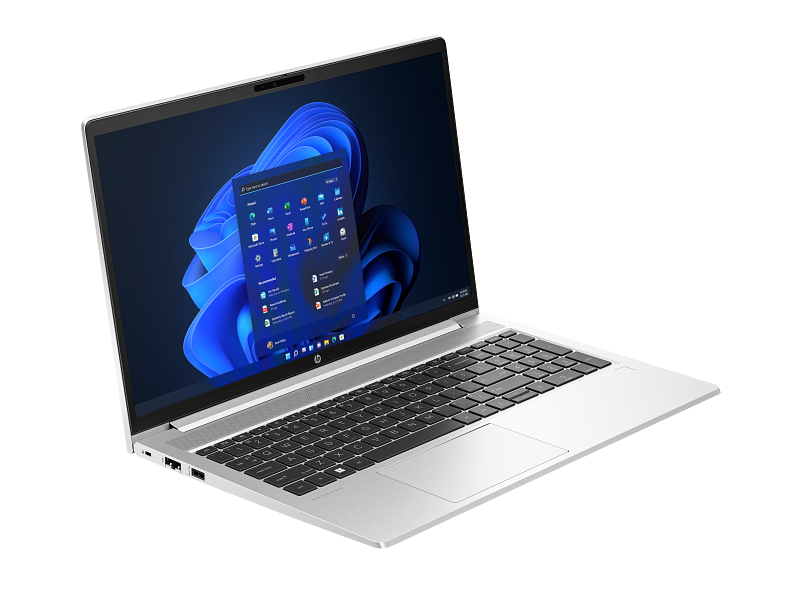
HP ProBook 450 G7 The 15.6″ entry business laptop with a large work area and a full NumPad
The 15.6″ model in the ProBook 400 series — HP's entry business platform for companies that want a brand-name laptop with a big screen and a numeric keypad, without the premium price of an EliteBook. As a refurbished business laptop from ITR Bulgaria, it brings a large work area, SO-DIMM upgrades and a real warranty at an accessible price.
Benefits
Why the HP ProBook 450 G7 is a sensible choice in the 15.6″ entry business class as a refurbished laptop
15.6″ screen — more work area
Higher configurations come with an FHD IPS panel at 250 nits with an anti-glare finish; base units use an HD panel. The larger diagonal gives more physical area for a spreadsheet and makes side-by-side windows usable; the number of visible rows depends on resolution and scaling.
Full numeric keypad (NumPad)
The 15.6″ layout leaves room for a dedicated NumPad — something the 14″ ProBook 440 G7 cannot fit. For an accountant or stock clerk entering figures all day, that is a daily difference in speed.
2× SO-DIMM — RAM upgrade to 32 GB
Two SO-DIMM slots for DDR4-2666 let you add memory after purchase — up to 32 GB. For a company that buys once and keeps a machine for years, that headroom is something fewer and fewer entry laptops offer.
Optional NVIDIA graphics
On select configurations — a discrete NVIDIA GeForce MX130 or the stronger MX250 (25W) above the integrated UHD 620. Helps with multi-monitor work and light visual tasks — uncommon in the entry class.
Full RJ45 and a rich port set
A full-size RJ45 Ethernet jack, 3× USB-A, USB-C, HDMI and an SD card reader. In an office that still runs wired networking and peripherals, most things plug in directly without adapters.
45 Wh battery with HP Fast Charge
HP Fast Charge returns up to 50% of the battery in about 30 minutes with the laptop off or in standby and the suitable adapter supplied with the machine; the time can vary by about 10%. Handy for a fixed workstation where the laptop spends the day on the desk and tops up quickly between tasks.
Aluminium lid, MIL-STD-810H
An aluminium lid over a plastic base, around 19.5 mm thick, tested against MIL-STD-810H durability standards. A solid build that handles daily office life better than a plastic budget laptop.
HP Wolf Security in the entry class
HP Sure Start Gen5 (BIOS protection and recovery), Sure Sense, Sure Click and BIOSphere Gen5 — hardware-hardened security usually tied to pricier business lines, here at a ProBook price.
720p camera with a physical shutter
On configurations with a camera, you get an HD camera for video calls with a mechanical privacy shutter. You close the lens with a finger when the camera is off — physical privacy, not just a software indicator.
Sensible value as a refurbished laptop
As a used laptop that has passed a technical audit and refurbishment, the HP ProBook 450 G7 gives you a brand-name 15.6″ business laptop at a price that often sits below a new budget model from a lower class.
HP ProBook 450 G7: the 15.6″ entry ProBook with a full NumPad
The size logic of the ProBook 400 series is easy once you see it written out: 430 is the 13.3″, 440 the 14″, 450 the 15.6″, and for 17.3″ HP offers the separate HP 470 G7, outside the series. In that ladder the 450 takes the spot of the entry laptop with a large work area — a 15.6″ display and a full numeric keypad on the keyboard. It's the choice for people who work mostly at a desk and value screen space over weight in the bag, without needing the pricier 15.6″ HP EliteBook 850 G7 from the premium line.
The numeric keypad is what sets the 450 apart from the 14″ 440 G7. At 14 inches there simply isn't room for a NumPad; at 15.6 inches there is. For an accountant entering figures into Excel or an ERP system all day, the dedicated number keys on the right are not a minor extra — they are the difference between hunt-and-peck with one hand and working in a rhythm. The same goes for anyone handling numeric data: stock counts, invoices, payroll. The 15.6″ format brings one more practical thing — more physical area for the table. More visible rows and less scrolling come with a suitable resolution and scaling.
To understand why this model looks and works the way it does, it helps to know why the ProBook exists at all. HP runs two main business lines: the EliteBook — the premium class with military-grade testing and the most expensive materials — and the ProBook, which arrived as the more affordable answer for small and medium companies. The idea is as old as the line itself: give the IT department the things it actually needs — a spill-resistant keyboard, hardware security, a durable chassis and easy serviceability — without the premium markup that not every business can justify. Over the years the ProBook moved from all-plastic shells to hybrid builds — an aluminium lid over a plastic base — and part of the EliteBook's security trickled down into the line. The 450 G7 is exactly that heritage in a 15.6″ format: a brand-name business laptop built to survive a corporate life, at a price a smaller business takes on more easily.
Under the lid the platform is Intel Comet Lake-U — Core i3, i5 or i7 from the 10th generation, with integrated UHD 620 graphics. On higher configurations HP adds discrete NVIDIA graphics (MX130 on lighter variants, MX250 on stronger ones), which is unusual for the entry class and genuinely helps with multiple monitors or light visual work. Memory sits on two SO-DIMM slots up to 32 GB DDR4-2666 — the RAM is upgradeable after purchase, something fewer and fewer laptops allow. Storage is an M.2 NVMe SSD, and some configurations keep room for a second 2.5″ SATA drive. The chassis is hybrid — an aluminium lid over a plastic base, around 19.5 mm — not the thinnest, but solid in the hand and tested against MIL-STD-810H durability standards. The 45 Wh battery with HP Fast Charge returns 50% in about half an hour.
The software this machine loads every morning was once worth queuing for at midnight. On August 24, 1995, lines coiled outside American stores of people waiting to buy… an operating system: Windows 95. Microsoft paid the Rolling Stones millions for the rights to “Start Me Up,” because the song advertised the most important new element — the Start button. Seven million copies sold in five weeks. Three decades on, that same button, with a different icon, still sits on the ProBook's screen — perhaps the longest-lived element in software history.
To be honest, the HP ProBook 450 G7 is not a travel laptop. Starting around 2.0 kg with a 45 Wh battery driving a 15.6″ screen, it isn't the machine you carry between offices every day. If travel is the priority, lighter 15.6″ entry models make more sense — the Lenovo ThinkPad E15 Gen 1 (Intel) weighs around 1.9 kg with the classic ThinkPad keyboard, and the Dell Latitude 3510 is about 1.86 kg with a plastic body per LaptopMedia's review. Both also offer discrete graphics as an option — AMD Radeon 625 or RX 640 on the Lenovo and NVIDIA GeForce MX230 on the Dell. And if you want the same idea on a newer platform, the successor HP ProBook 450 G8 moves to Intel 11th Gen with Iris Xe graphics — stronger integrated graphics, but usually at a higher price as a refurbished unit.
As a refurbished laptop from ITR Bulgaria, the HP ProBook 450 G7 has a clear logic. This is a business-class used laptop that has passed a technical audit and refurbishment — not just a pre-owned laptop with an unknown history, but a checked and prepared refurbished HP ProBook with a real warranty. For a company equipping office staff at fixed workstations, or for an accounting team that relies on a NumPad and a large screen, it gives you a brand-name business laptop at a price that makes sense for the budget.
Who it's for
Scenarios where the HP ProBook 450 G7 makes the most sense
Accountants and number work
Someone who spends the day in Excel and accounting software enters figures faster with the dedicated keypad, and the 15.6″ screen gives more physical area for spreadsheets; how many rows are visible depends on resolution and scaling. Here the NumPad is a working tool, not an extra.
Office staff who prioritise the screen
For an employee who works mostly at a desk and rarely carries the laptop, the larger diagonal matters more than weight. Two windows side by side, a document and a table at once — without an external monitor.
Small business — desktop replacement
A small company that wants a single unit for a fixed workstation instead of a desktop tower. The rich ports and full RJ45 handle peripherals and wired networking, and the SO-DIMM slots leave room for later upgrades.
Educational institutions
A school or training centre equipping a computer lab or admin office. The aluminium lid and HP security hold up to heavy use, while refurbished units bring the cost of a brand-name machine into a tight budget.
Model highlights
15.6″ in the ProBook 400 size line
In this generation, ProBook 400 spans three sizes: HP ProBook 430 G7 (13.3″), HP ProBook 440 G7 (14″) and HP ProBook 450 G7 (15.6″). The separate HP 470 G7 is a 17.3″ alternative. The 450 is the big-screen choice for desk-based work, sitting below the premium HP EliteBook 850 G7.
Intel Comet Lake-U platform
Core i3-10110U, i5-10210U or i7-10510U from the 10th generation, low-power U-series. Enough for office apps, browser, documents and video calls in the right configuration.
Optional NVIDIA MX130 / MX250 (the MX250 in LaptopMedia’s tested unit was 25 W)
On select configurations — discrete graphics above the integrated UHD 620. The MX250 version is a 25W variant, stronger than the standard one. Uncommon for the entry class.
2× SO-DIMM up to 32 GB DDR4-2666
Two slots for SO-DIMM memory rather than soldered RAM. That means the memory can be upgraded after purchase — up to 32 GB DDR4-2666 at an entry price.
M.2 NVMe + optional 2.5″ SATA bay
The primary drive is an M.2 NVMe SSD, and some configurations keep room for a second 2.5″ SATA drive — extra capacity for archives or data at a fixed workstation.
Full RJ45 + 3× USB-A + HDMI + SD
A full-size Ethernet jack, three USB-A ports, USB-C, HDMI 1.4b and an SD reader. A rich set for an office with wired networking and peripherals — most things plug in without adapters.
Spill-resistant keyboard with optional backlight
An HP spill-resistant keyboard with optional backlighting and a full numeric keypad — a combination the 14″ models in the series don't have. Quiet typing through long document work.
A logical choice as a refurbished laptop
An aluminium-lidded MIL-STD-810H chassis, HP Wolf Security components and widely available spare parts make the HP ProBook 450 G7 a practical used laptop, post-refurbishment, for a fixed workstation.
Refurbished by ITR Bulgaria: what value do you get?
Buying a refurbished business-class laptop makes the most sense when the device has gone through a standardised internal refurbishment process and ships with a real warranty. That is how used laptops become refurbished laptops — a practical, dependable and professional alternative to new budget machines, or a far more reasonable purchase than new premium equivalents.
- ✓ Technical audit and cosmetic grading of the device against an internal standard
- ✓ Refurbishment, cleaning, quality improvement and configuration to a standard for repeat business use
- ✓ Use of original software and a configuration prepared for the specific model
- ✓ Packaging, a real warranty and model support from ITR Bulgaria
Ready to see what's in stock?
The HP ProBook 450 G7 is a refurbished business laptop from the 15.6″ entry class of the ProBook 400 series — checked, prepared and delivered with a warranty from ITR Bulgaria. Browse current availability or get in touch for help.
Additional information
Where the HP ProBook 450 G7 fits in the series ▼
The HP ProBook 450 G7 belongs to the ProBook 400 series — HP's entry business line. It sits below the premium EliteBook 800 family (which includes the 15.6″ HP EliteBook 850 G7) and above the home-oriented lines. The ProBook was created as the more affordable brand-name business laptop: it keeps a spill-resistant keyboard, hardware security and an aluminium lid, but at a more reasonable price than the EliteBook.
Within the 400 series itself, size defines the model: HP ProBook 430 G7 (13.3″, compact), HP ProBook 440 G7 (14″, balanced, no NumPad) and HP ProBook 450 G7 (15.6″, a large work area with a numeric keypad). The separate HP 470 G7 is the 17.3″ alternative, with the largest diagonal among these models. Higher up HP's business hierarchy, in the 15.6″ class, sits the HP ProBook 650 G7 with a richer feature set.
The HP ProBook 450 G7 is the successor to the HP ProBook 450 G6 and is followed by the HP ProBook 450 G8 (Intel 11th Gen, Tiger Lake with Iris Xe graphics). The G7 remains a common generation on the refurbished market thanks to the long business life cycle of the series.
The HP ProBook 450 G7 is not ideal if… ▼
- You carry the laptop every day or travel often. Starting around 2.0 kg with a 45 Wh battery driving a 15.6″ screen, this is not a travel machine. Lighter 15.6″ entry models (Lenovo ThinkPad E15 Gen 1, Dell Latitude 3510) or a smaller 14″ HP ProBook 440 G7 make more sense.
- You need Thunderbolt and single-cable docking. The HP ProBook 450 G7 relies on USB-C 5Gbps without Thunderbolt. For a TB docking ecosystem, look at a higher class (HP EliteBook 800/850).
- You want a convertible form factor — 360-degree hinges, tablet mode or pen input. The HP ProBook 450 G7 is a standard clamshell; touch is only a display option, not a tablet mode.
- You rely on Windows Hello face recognition. An IR camera for it is only an option on some configurations, so check the specific unit; an optional fingerprint reader is the other biometric route.
- You expect guaranteed discrete graphics. The NVIDIA MX130/MX250 is an option on select configurations, not on every unit. Base configurations use the integrated UHD 620.
- You need a specific configuration (a particular CPU, RAM, SSD, display type or the presence of a dGPU). Configurations vary — it's worth checking the specific unit.
Which size to choose ▼
13.3″ class (HP ProBook 430 G7): the most compact of the models covered here, with the lowest listed starting weight for a non-touch version — 1.49 kg. Suited to carrying around and working on the move. Trade-off: the least screen area, no numeric keypad.
14″ class (HP ProBook 440 G7): the balanced size for people who both carry the laptop and work at a desk. Still no NumPad — 14″ doesn't leave room for a number block.
15.6″ class (HP ProBook 450 G7): a large work area and a full numeric keypad. Suited to desk-based work, accounting and spreadsheets. Trade-off: weight around 2.0 kg — not for daily carrying.
17.3″ class (HP 470 G7): the largest diagonal for people who use the machine almost entirely in one place. The highest starting weight among these models — 2.36 kg.
Construction: the HP ProBook 450 G7 has an aluminium lid over a plastic base, around 19.5 mm thick, in natural silver, tested against MIL-STD-810H durability standards. A standard clamshell with no 360-degree hinges.
Alternative models ▼
Within HP:
HP ProBook 440 G7 — the 14″ sibling from the same generation. Lighter and easier to carry, but without a numeric keypad. A logical choice if you carry the laptop and don't need a NumPad.
HP 470 G7 — the 17.3″ alternative. Even more physical screen area for work that stays almost entirely in one place. Trade-off: the bulkiest of these four models, with the highest starting weight — 2.36 kg.
HP ProBook 450 G8 — the next generation (Intel 11th Gen, Tiger Lake). Stronger integrated Iris Xe graphics and a more current platform. Usually at a higher refurbished price; the G7 is the more affordable option.
HP EliteBook 850 G7 — the 15.6″ model from the premium HP EliteBook 800 line. A higher-class chassis, richer security and a docking ecosystem. More expensive; reasonable if you want premium 15.6″ rather than entry.
Cross-brand alternatives (15.6″, entry business class, Intel 10th Gen):
Dell Latitude 3510 — the entry Dell Latitude in 15.6″. Lighter (~1.86 kg), with a plastic body per LaptopMedia’s review. It offers an optional NVIDIA GeForce MX230, while the HP ProBook 450 G7 offers MX130 or MX250.
Lenovo ThinkPad E15 Gen 1 (Intel) — the accessible Lenovo ThinkPad line in 15.6″. Lighter (~1.9 kg) with the classic Lenovo ThinkPad keyboard and TrackPoint. More portable, but the HP ProBook 450 G7 offers a dGPU option and a solid hybrid chassis (aluminium lid, plastic base).
Note: don't treat the HP ProBook 450 G7 as equivalent to premium 15.6″ models such as the HP EliteBook 850 or Dell Latitude 5510 — those are a higher business class with a different price and target group.
Refurbished by ITR Bulgaria: what value do you get? ▼
The HP ProBook 450 G7 is among the models where refurbishment has a clear practical logic. The chassis is built for service: access to the internals is relatively easy, the SO-DIMM slots and M.2 SSD are replaceable, and some configurations also have room for a second 2.5″ drive. That makes the technical audit, the refurbishment and any later memory or storage upgrade practical.
On top of that, the ProBook is a widely distributed business line — spare parts, chargers and accessories stay available on the market for years after the model's release. After it passes refurbishment, the HP ProBook 450 G7 is prepared for repeat business use as a refurbished laptop and ships with a real warranty and model support from ITR Bulgaria — a practical choice for a company equipping workstations at an accessible price.
Frequently asked questions ▼
Is the HP ProBook 450 G7 a good choice as a used laptop?
For desk-based work — yes. The HP ProBook 450 G7 gives you a brand-name 15.6″ business laptop with a full numeric keypad, an aluminium lid and HP security, at a price that usually sits below a new budget model from a lower class. As a refurbished laptop that has passed a technical audit, it's a practical choice for accounting, office admin and desktop replacement.
What's the difference between the HP ProBook 450 G7 and the HP ProBook 440 G7?
The main practical difference is size and keyboard. The HP ProBook 440 G7 is 14″ and has no room for a number block; the HP ProBook 450 G7 is 15.6″ and has a full NumPad. Both models offer a discrete NVIDIA graphics option (GeForce MX130 or MX250). The 440 is lighter and easier to carry.
What's the difference between the HP ProBook 450 G7 and the G8?
The G8 moves to Intel 11th Gen (Tiger Lake) with stronger integrated Iris Xe graphics instead of the UHD 620 on the G7. The chassis and overall concept are close. The G7 relies on UHD 620 or an optional MX250 dGPU and is usually more affordable as a refurbished laptop; the G8 is the more current platform.
Does the keyboard have a numeric keypad (NumPad)?
Yes. As a 15.6″ model, the HP ProBook 450 G7 has a full dedicated number block on the right of the keyboard — together with spill resistance; backlighting is optional. It's one of the reasons the model is a logical fit for accountants and anyone entering numeric data all day.
What configurations come up with the HP ProBook 450 G7?
The model comes with Intel Core i3, i5 or i7 from the 10th generation (Comet Lake-U), RAM up to 32 GB DDR4-2666 across two SO-DIMM slots, and an M.2 NVMe SSD. On select units the following may be available: discrete NVIDIA MX130 or MX250 graphics, an FHD IPS display (250 nits) or a touch screen, a fingerprint reader and a second 2.5″ SATA drive. It's worth checking the specific unit.