
 EN
 BG

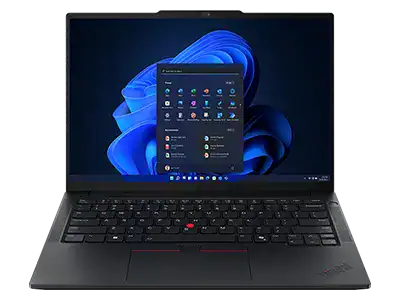
Lenovo ThinkPad E15 Gen 1 (Intel) The first E15 — an entry ThinkPad with a full keyboard and TrackPoint
The Lenovo ThinkPad E15 Gen 1 is a 15.6-inch business laptop from the affordable ThinkPad E series — with a real ThinkPad keyboard, a number pad and the red TrackPoint, at an entry price. As a refurbished business laptop from ITR Bulgaria, it's a practical way to get the ThinkPad typing feel in a larger format without paying for the T or L series.
Benefits
Why the Lenovo ThinkPad E15 Gen 1 (Intel) makes sense as a refurbished business laptop for people who type a lot
Full ThinkPad keyboard with number pad
A full-size ThinkPad keyboard with a separate number pad and a deep 1.8 mm key travel — the T series typing feel in a 15.6-inch entry model. Spill-resistant build for the occasional accident.
TrackPoint in the middle of the keyboard
The red nub moves the cursor without your hand leaving the keys. For someone entering numbers or text all day, that saves thousands of small movements — and it's rare in the entry class.
1× SO-DIMM up to 64 GB — rare for entry
One SO-DIMM slot with an upgrade path to 64 GB DDR4-2666. Most entry rivals solder the RAM; here a machine with 8 GB today can become 16 or 32 GB later, with no replacement.
Light for a 15.6-inch class — ~1.90 kg
An aluminium lid over a polymer composite base brings the start weight down to about 1.90 kg — within the range of typical 15.6-inch entry rivals, which often sit between 1.85 and 2.00 kg.
Optional ThinkShutter — a physical camera cover
On configurations with ThinkShutter, a mechanical slider closes the lens of the 720p camera. No software, no doubt about whether the camera is watching — for people who work with sensitive clients or documents.
USB-C with DisplayPort and Power Delivery + full-size RJ45
USB-C with DisplayPort and Power Delivery for docking and an external monitor, plus a full-size RJ45 port for wired networks — richer connectivity than you usually expect from an entry business laptop.
MIL-STD-810G tested build
The series passes military tests for vibration, shock, temperature and humidity (12 procedures) — durability that ThinkPad carries into the more affordable E line, not only the premium models.
Rapid Charge — up to 80% in about an hour
A 45 Wh battery and Lenovo Rapid Charge — up to 80% in about an hour with a suitable 65 W USB-C charger and the laptop switched off. Useful for a quick top-up between two meetings.
15.6″ FHD IPS with anti-glare — optional
On the FHD IPS configurations the screen is 250 nits with a matte anti-glare finish; an FHD TN panel at 220 nits is also offered — more working area for spreadsheets and documents, without reflections from a window or lamp.
Value as a refurbished laptop
As a used laptop from the ThinkPad E series, the Lenovo ThinkPad E15 Gen 1 (Intel) gives you the keyboard, TrackPoint and MIL-STD build at an accessible price — ThinkPad heritage without the premium tag.
Lenovo ThinkPad E15 Gen 1 (Intel): the first E15 — an entry ThinkPad with NumPad and TrackPoint
Among the 15.6-inch entry business laptops of its generation, only one carried a real ThinkPad keyboard — with the red TrackPoint in the middle, a deep 1.8 mm key travel, and a ThinkShutter cover over the camera. That one is the Lenovo ThinkPad E15 Gen 1. The other machines in the class offered a full-size keyboard with a number pad, but no TrackPoint and none of the typing feel that keeps people coming back to the brand. That is what makes the Lenovo ThinkPad E15 Gen 1 (Intel) a recognisable option for a buyer who wants ThinkPad comfort in a larger format, at an entry price — without paying for the T or L series.
The ThinkPad typing feel is not an accident. The keyboard is one of the few things Lenovo carried over almost untouched from the IBM era — the deep travel, the slightly dished keycaps and the TrackPoint are the result of decades of tuning, not a single design season. The idea behind the red nub in the centre is simple: your hand never leaves the letters to reach for a mouse or trackpad, because the cursor moves from where you are already typing. For someone who spends hours in text and spreadsheets, that saves thousands of small movements a day. The E15 Gen 1 is the first 15.6-inch E model under the new naming — the line that previously ran as the Lenovo ThinkPad E580 and E590 was renamed to E15. Against it, the HP ProBook 450 G7 offers a full number pad but no TrackPoint, and weighs around 2.00 kg; the Dell Latitude 3510 also has no TrackPoint, at about 1.86 kg. For a buyer who types a lot, that is the practical difference — not the badge on the lid, but where the cursor sits while the hands stay on the keys.
The E15 itself is the first of a new name, but not of a new idea. When Lenovo carried the E-series redesign into the 15.6-inch format, the brief was literal: keep everything small firms buy E machines for — the keyboard, the sober construction, the honest price — and dress it in a more modern, slimmer body with trimmed bezels. The result is a machine that looks a class more expensive than it is; and in the entry segment, that distance between looks and price is the shortest definition of a good deal.
Under the keyboard sits a 10th-generation Intel Core platform (Comet Lake-U) — i3, i5 or i7 depending on the unit. This is a mature, efficient chip for office work: documents, a browser with dozens of tabs, ERP/CRM systems, video calls. More interesting for long-term use is the memory — one SO-DIMM slot with an upgrade path to 64 GB DDR4-2666, rare for the entry tier where most rivals solder the RAM to the board. In practice that means a machine with 8 GB today can become 16 or 32 GB tomorrow, with no replacement. The chassis pairs an aluminium lid with a polymer composite base — a combination Lenovo uses to bring the 15.6-inch model to a listed weight of around 1.90 kg, less than the HP ProBook 450 G7’s starting 2.00 kg but more than the Dell Latitude 3510’s starting 1.79 kg, its two direct entry rivals. The lid passes MIL-STD-810G tests for vibration, shock and temperature, and on configurations with ThinkShutter the slider closes the camera physically. Connectivity is richer than expected for entry too: USB-C with DisplayPort and Power Delivery for docking, a full-size RJ45 Ethernet port for wired networks, and three USB-A ports. The newer Lenovo ThinkPad E15 Gen 2 moves to Intel Tiger Lake, but with its single-channel memory the integrated graphics also run as UHD rather than Iris Xe; the Gen 1 stays on Comet Lake with integrated UHD graphics — a difference that only matters if you rely on stronger integrated graphics.
The honest trade-off of the Lenovo ThinkPad E15 Gen 1 (Intel) is the battery. The standard configuration is 45 Wh — the entry standard, which does the job for part of the day, but on a full day away from the office the charger travels with you. Rapid Charge softens that with roughly 80% in an hour, but if battery life is your leading priority, an L or T series model with a larger battery is the more logical choice. The camera is 720p without IR, so there's no Windows Hello face unlock — biometric sign-in runs through the optional fingerprint reader instead. If you need a newer platform with Intel Tiger Lake, the next step is the E15 Gen 2. But if you type a lot and want a ThinkPad keyboard with TrackPoint in a 15.6-inch format without the T series price, the Gen 1 stays the sensible choice. As a refurbished laptop from ITR Bulgaria, the E15 Gen 1 is an affordable way to get ThinkPad heritage — a used business laptop that has been through a technical audit and prepared for a second working life with a real warranty.
Who it's for
Scenarios where the Lenovo ThinkPad E15 Gen 1 (Intel) makes the most sense
An accountant who lives in spreadsheets
The number pad sits under the right hand for fast entry, and the TrackPoint moves the cursor between cells and menus without the hand leaving the keyboard. That exact combination is rare in the entry class.
People who type a lot on a larger screen
Anyone who spends the day in long documents, proposals or correspondence and wants both a large screen and a deep key travel. The ThinkPad keyboard makes hours of typing noticeably more comfortable.
A student in a technical field
ThinkPad durability and a proper keyboard at an accessible price, plus the SO-DIMM slot for more RAM when projects get heavier. A machine that lasts several academic years without replacement.
A company standardised on ThinkPad
An IT team already equipping staff with ThinkPads that wants a more affordable 15.6-inch model in the same ecosystem — same management tools (Commercial Vantage) and a familiar interface for users.
Model highlights
ThinkPad keyboard + NumPad + TrackPoint
A full-size keyboard with a number pad, a deep 1.8 mm key travel and the red TrackPoint in the centre — the ThinkPad typing heritage carried into an entry 15.6-inch model. Spill-resistant build.
1× SO-DIMM up to 64 GB DDR4-2666
One memory slot with an upgrade path to 64 GB — rare for the entry tier, where RAM is usually soldered. A real long-term margin for companies that buy once and use the machine for years.
Light for 15.6″ — about 1.90 kg
An aluminium lid over a polymer composite base brings the weight below the class average. Less weight in the bag for daily carry between office, home and meetings.
USB-C with DisplayPort and Power Delivery + RJ45 + 3× USB-A
USB-C with DisplayPort and Power Delivery for docking and an external monitor, a full-size RJ45 Ethernet port for wired networks, three USB-A ports plus HDMI, with no SD reader — richer than the entry norm.
ThinkShield security + optional ThinkShutter
dTPM 2.0 as standard, an optional match-on-chip fingerprint reader, a Kensington slot and the physical ThinkShutter slider over the camera — business security at an entry price.
MIL-STD-810G durability
12 military test procedures for vibration, shock, temperature and humidity. ThinkPad carries the same durability approach into the more affordable E line, not only the premium T and X models.
45 Wh + Rapid Charge
A 45 Wh battery with Lenovo Rapid Charge, which returns up to 80% in about an hour with a suitable 65 W USB-C charger and the laptop switched off — a quick top-up between two meetings.
A sensible choice as a refurbished laptop
The ThinkPad E series is the affordable door into the ThinkPad ecosystem. As a used laptop that has been refurbished, the Lenovo ThinkPad E15 Gen 1 (Intel) gives keyboard, TrackPoint and durability at a price entry budgets can take.
Refurbished by ITR Bulgaria: what value do you get?
Buying a refurbished business-class laptop makes the most sense when the device has been through a standardised internal refurbishment process and ships with a real warranty. That is how a used laptop becomes a refurbished laptop — a practical, dependable and professional alternative to a new budget machine, and a far more reasonable purchase than a new premium equivalent.
- ✓ Technical audit and cosmetic grading of the device against an internal standard
- ✓ Refurbishment, cleaning, quality improvement and configuration to a standard for repeat business use
- ✓ Use of original software and a prepared configuration for the model
- ✓ Packaging, a real warranty and model support from ITR Bulgaria
Ready to see the available units?
The Lenovo ThinkPad E15 Gen 1 (Intel) is a refurbished business laptop from the ThinkPad E series — with a real ThinkPad keyboard and TrackPoint, prepared for a second working life. Browse the current stock or get in touch for help.
Additional information
Where the Lenovo ThinkPad E15 Gen 1 (Intel) fits in the series ▼
The ThinkPad E series is the affordable door into the ThinkPad ecosystem — an entry-level business line for small and mid-sized companies. The ThinkPad hierarchy runs like this: Lenovo ThinkPad X1 Carbon and Lenovo ThinkPad X1 Yoga are the ultra-premium ultraportable flagships; the T series (T14, T15) is the premium workhorse for corporate use; the L series is a more affordable business option with the same philosophy; and the E series sits at the most accessible end, without giving up the key ThinkPad elements — the keyboard, the TrackPoint and MIL-STD durability.
The Lenovo ThinkPad E15 Gen 1 (Intel) is the first 15.6-inch E model under the new naming. Before it, that role was filled by the Lenovo ThinkPad E580 and Lenovo ThinkPad E590; with the move to "Lenovo ThinkPad E15 Gen 1 (Intel)", Lenovo aligned the E line by size (Lenovo ThinkPad E14 for 14″, Lenovo ThinkPad E15 Gen 1 (Intel) for 15.6″) instead of the older three-digit names.
The Gen 1 uses Intel's 10th generation (Comet Lake-U). Its direct successor is the Lenovo ThinkPad E15 Gen 2 (Intel), which moves to Intel's 11th generation (Tiger Lake). With its single-channel memory, the integrated graphics run as UHD rather than Iris Xe.
The Lenovo ThinkPad E15 Gen 1 (Intel) is not ideal if… ▼
- You need a full day of work without a charger — the 45 Wh battery (the entry standard) is a compromise. For more endurance, look at the L or T series with a larger battery.
- You want a newer platform with Iris Xe graphics — the Lenovo ThinkPad E15 Gen 1 (Intel) is on Intel's 10th generation with integrated UHD graphics. The direct successor, the Lenovo ThinkPad E15 Gen 2 (Intel), has Tiger Lake, but its single-channel memory means the integrated graphics also run as UHD.
- You rely on Windows Hello face recognition — the camera is 720p without IR. Biometric unlock runs through the optional fingerprint reader, not the camera.
- Your priority is minimal weight and thinness — even though the Lenovo ThinkPad E15 Gen 1 (Intel) is light for the 15.6″ class, the 15.6-inch format is larger than a 14″ ThinkPad. For a more compact size, look at the Lenovo ThinkPad E14 Gen 1 (Intel).
- You need strong discrete graphics for video editing or 3D. Some configurations offer optional discrete graphics, but it is not standard and not built for heavy graphics work.
- You need a guaranteed specific configuration (a particular CPU, RAM, SSD, FHD screen or fingerprint reader) — configurations vary, so it’s important to check the specific unit. The battery is 45 Wh by specification.
Choosing the right size and build ▼
15.6-inch class (Lenovo ThinkPad E15 Gen 1 (Intel)): more working area for spreadsheets, long documents and a multi-window setup, plus a full number pad. Comfortable for work mostly at a desk and for people who want a larger screen.
14-inch class (Lenovo ThinkPad E14 Gen 1 (Intel)): the same E series in a more compact format — smaller and lighter for frequent travel, with the same ThinkPad keyboard and TrackPoint, but without a separate number pad.
Higher business class (Lenovo ThinkPad L15 / Lenovo ThinkPad T15 Gen 1 (Intel)): if you want a more mature set of business features, a larger battery or a better camera in a 15.6″ format, the L and T series are the step up — at a higher price.
Build: the Lenovo ThinkPad E15 Gen 1 (Intel) is a standard laptop with no 360-degree hinges. The chassis pairs an aluminium lid with a polymer composite base, about 18.9 mm thick.
Alternative models ▼
Within Lenovo:
Lenovo ThinkPad E15 Gen 2 (Intel) — the direct successor. A newer Intel Tiger Lake platform; with its single-channel memory the integrated graphics run as UHD rather than Iris Xe. The logical choice if you want a more current chip; the Gen 1 stays a more affordable refurbished option with the same keyboard and chassis.
Lenovo ThinkPad E14 Gen 1 (Intel) — the 14-inch sibling from the same generation. More compact and lighter for frequent travel, but without a separate number pad. The choice is size versus portability.
Lenovo ThinkPad L15 Gen 1 (Intel) — a step up in business class. A more mature feature set with the same 45 Wh battery, but at a higher price as a refurbished laptop.
Cross-brand alternatives (15.6″, entry business class):
HP ProBook 450 G7 — a 15.6-inch entry business laptop with a full number pad, but no TrackPoint. Heavier (around 2.00 kg). A logical choice for HP-oriented IT teams; the Lenovo ThinkPad E15 Gen 1 (Intel) leads on typing comfort and weight.
Dell Latitude 3510 — an entry Dell Latitude in a 15.6″ format. About 1.86 kg, also without a TrackPoint. The trade-off against the Lenovo ThinkPad E15 Gen 1 (Intel) is exactly that navigation without the hands leaving the keys — a practical difference for people who type a lot.
Note: the Lenovo ThinkPad E15 Gen 1 (Intel) is entry-level business class. Don't compare it directly with premium models such as the Lenovo ThinkPad T15 or X1 — those are a higher class, with a different target audience and price.
Refurbished by ITR Bulgaria: what value do you get? ▼
The Lenovo ThinkPad E15 Gen 1 (Intel) is convenient to refurbish for two specific reasons. First, the ThinkPad build is designed for access to the components: the SO-DIMM slots and the M.2 NVMe SSD are replaceable, which makes the technical audit and preparation for reuse predictable. Second, the E series is a recognisable part of the ThinkPad ecosystem, so it fits naturally into existing company standards.
After going through the standardised refurbishment process, the model is prepared for repeat business use with a real warranty and model support from ITR Bulgaria. That is the difference between a random used laptop and a refurbished business laptop with a professional history — and it matters especially in the entry class, where the value of the price carries a lot of weight.
Frequently asked questions ▼
Is the Lenovo ThinkPad E15 Gen 1 (Intel) a good choice as a used laptop?
Yes, for a specific buyer profile. If you type a lot and want a ThinkPad keyboard with a TrackPoint and a number pad in a 15.6-inch format, without paying for the T or L series, the Lenovo ThinkPad E15 Gen 1 (Intel) is a sensible choice. As a refurbished laptop from the entry business class, it offers ThinkPad durability and SO-DIMM upgrade headroom at an accessible price.
What's the difference between the Lenovo ThinkPad E15 Gen 1 (Intel) and the Lenovo ThinkPad E15 Gen 2 (Intel)?
The main difference is the platform. The Lenovo ThinkPad E15 Gen 1 (Intel) uses Intel's 10th generation (Comet Lake-U) with integrated UHD graphics, while the Lenovo ThinkPad E15 Gen 2 (Intel) moves to Intel's 11th generation (Tiger Lake), whose single-channel memory means UHD rather than Iris Xe — noticeably stronger integrated graphics. The keyboard, TrackPoint, chassis and SO-DIMM design stay similar. The Gen 1 is usually the more affordable refurbished option; the Gen 2 is the more current platform.
How much RAM does it support, and can it be upgraded?
The Lenovo ThinkPad E15 Gen 1 (Intel) has one SO-DIMM slot supporting up to 64 GB DDR4-2666 — rare for the entry tier, where RAM is often soldered. That means a real upgrade after purchase: a machine with 8 GB can become 16, 32 GB or more. The M.2 NVMe SSD is also replaceable. The exact memory available depends on the specific unit.
What configurations does the Lenovo ThinkPad E15 Gen 1 (Intel) come in?
The model comes with Intel Core i3, i5 or i7 from the 10th generation, varying amounts of DDR4-2666 RAM in the single SO-DIMM slot (up to 64 GB total), an M.2 NVMe SSD up to 1 TB, and a 15.6″ FHD screen with either a TN panel at 220 nits or an IPS panel at 250 nits, both with an anti-glare finish. On some units the following may be available: an optional fingerprint reader, a backlit keyboard and optional discrete graphics. The battery is 45 Wh, and USB-C supports DisplayPort and Power Delivery, without Thunderbolt. It's important to check the specific unit.