
 EN
EN BG
BG
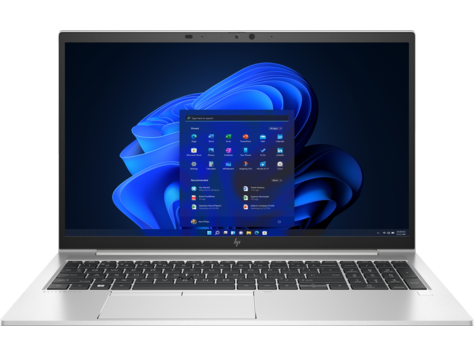
HP EliteBook 850 G8 The 15.6″ EliteBook for spreadsheets and multi-window work
The HP EliteBook 850 G8 is the 15.6″ member of the premium EliteBook 800 line — the same machine in spirit as the HP EliteBook 840 G8, stretched onto a larger frame, with room for a full number pad to the right of the keyboard. The G8 generation brings Intel 11th Gen, dual Thunderbolt 4 and a discrete-graphics option that is rare in its class. As a refurbished business laptop from ITR Bulgaria, it is a no-surprises choice for desk work.
Benefits
Why the HP EliteBook 850 G8 is a strong pick for spreadsheet and multi-window work as a refurbished laptop
15.6″ screen with full number pad
The larger frame makes room for a number pad to the right of the keyboard — a meaningful difference for anyone keying in figures for hours in spreadsheets and accounting software.
Discrete MX450 graphics (option)
The only model in the EliteBook 800 G8 series with a discrete GPU option. On select configurations, NVIDIA GeForce MX450 2 GB adds graphics power above the integrated Iris Xe.
56 Wh battery with fast charge
A 56 Wh battery (larger than the 53 Wh in the HP EliteBook 840 G8) with HP Fast Charge — up to 50% in about 30 minutes with the laptop off or in standby and a compatible adapter of at least 65 W. Enough for a desk-based workday with headroom.
2× SO-DIMM up to 64 GB
Two accessible SO-DIMM slots for DDR4-3200, up to 64 GB. HP kept the memory upgradeable while part of the competition moved to soldered RAM — more memory can be added after purchase.
HP Wolf Security platform
Hardware-hardened security from the premium business class: HP Sure Start, Sure Run, Sure Recover, Sure Sense and Sure Click, plus TPM 2.0. Availability and operation of individual features depend on the configuration, operating system and applicable licence.
Dual Thunderbolt 4 docking
2× Thunderbolt 4 (USB4, DisplayPort 1.4, Power Delivery), 2× USB-A and HDMI 2.0b. Single-cable docking to external monitors, with wired networking through a Thunderbolt or USB-C dock.
Bang & Olufsen audio
Bang & Olufsen speakers and a microphone array with AI noise filtering — cleaner sound on video calls in a noisy office.
HP Sure View Reflect (option)
On select configurations — an integrated privacy panel with up to 1000 nits that dims the screen to side viewers at the press of a button.
Aluminium chassis, MIL-STD-810H
A machined aluminium body that passes MIL-STD-810H durability testing.
Sensible value as a refurbished laptop
As a used business laptop after technical audit and refurbishment, the HP EliteBook 850 G8 gives access to the 15.6″ premium business class at a far more accessible price than a new equivalent.
HP EliteBook 850 G8: the 15.6″ EliteBook for spreadsheets and multi-window work
When the 14-inch format is a compromise between portability and working area, sometimes that compromise pulls the wrong way. For people who spend the day in spreadsheets, reviewing photos, or working with several windows open at once, a bigger screen is not a luxury — it is a priority felt every hour. The HP EliteBook 850 G8 is the 15.6″ member of the EliteBook 800 line: the same machine in spirit as the HP EliteBook 840 G8, stretched onto a larger frame, with room for a full number pad to the right of the keyboard.
The number in the name is not arbitrary. Among the standard Intel models of the EliteBook 800 G8 generation, the second-to-last digit of the three-digit number follows screen size: the HP EliteBook 830 G8 is the 13.3″ model, the HP EliteBook 840 G8 is the 14″, and the HP EliteBook 850 G8 is the 15.6″. The EliteBook 800 series appeared in 2013 — the same year HP moved its mobile workstations under the ZBook name. Back then the most compact model was the EliteBook 820; the 13.3″ 830 replaced it with the G5 generation. In the G8 generation, the 850 sits at the top of the series by size — the member HP makes for people who want more screen without leaving the premium business class. That is why the HP EliteBook 850 G8 is not a "different" machine from the HP EliteBook 840 G8; it is the same EliteBook philosophy of corporate durability and security, simply in a larger body.
The naming code carries an older layer, too, one that explains the series' character. After HP merged with Compaq in 2002, the company's business laptops shipped for years under the dual badge “HP Compaq” — the nc and nx series, the machines with which a generation of system administrators equipped their offices. On 10 June 2008 HP introduced a new premium line under a new name — EliteBook, which initially joined the HP Compaq business models. So every HP EliteBook 850 G8 carries a double inheritance — the engineering schools of two former rivals, fused into one machine. Few business lines can point to such a pedigree with an exact date of birth.
The chassis is machined from aluminium and passes MIL-STD-810H testing. The result is a machine that, after years of daily use, still opens without flex and sits solid on the desk. Underneath there is a decision worth noting: two accessible SO-DIMM slots for memory up to 64 GB DDR4-3200. At a time when part of the competition moved to soldered RAM in its flagship lines, HP deliberately kept the memory upgradeable in the EliteBook 800 — and it shows here. For a refurbished-laptop buyer, that is the difference between a machine that stays as it was bought and one that can grow with your needs: more memory today, a bigger SSD tomorrow.
What does the larger frame actually buy you? A full number pad — for an accountant or financial analyst keying in figures for hours, it saves thousands of needless hand movements every day. And something rare in the class: a discrete NVIDIA GeForce MX450 graphics option — the only one in the entire EliteBook 800 G8 series. Against its direct rivals, the choice comes down to emphasis. The Dell Latitude 7520 starts at 1.53 kg with a carbon-fibre chassis, a 42 Wh battery, an M.2 SSD and an FHD display, while Dell lists 1.76 kg for the aluminium version. It offers Dell Optimizer software and an optional 1080p camera; the Lenovo ThinkPad T15 Gen 2 (from 1.75 kg with a PPS lid and UHD display, with one SO-DIMM slot plus soldered memory) brings the classic ThinkPad keyboard with TrackPoint and ThinkShield security. The HP EliteBook 850 G8 answers with Bang & Olufsen speakers and the Sure View Reflect option — an integrated privacy panel that dims the screen to side viewers.
As a refurbished laptop from the premium business class, the HP EliteBook 850 G8 has a logic that comes from the series itself. HP supports the model with long-running BIOS and driver updates, the components are standardised, and the two SO-DIMM slots plus the replaceable M.2 NVMe SSD make the technical audit and refurbishment straightforward. After passing through ITR Bulgaria's standardised process, the model comes with a real warranty and support — a machine where you know exactly what you are getting.
The honest trade-off is clear: the HP EliteBook 850 G8 is not a travel laptop. At a starting weight of 1.69 kg without a touchscreen and a 15.6″ body, it is a primary desk or office machine rather than a daily bag companion. If portability is the real priority, the better pick from the same generation is the HP EliteBook 840 G8 (14″) or the 830 G8 (13.3″) — the same business features in a smaller, lighter body. The 850 G8 is for the opposite scenario: when the screen and the working area matter more than the grams.
Who it suits
Scenarios where the HP EliteBook 850 G8 makes the most sense
Financial analysts with heavy spreadsheet work
An analyst who keeps wide Excel models open all day gains twice over: the 15.6″ screen fits more columns at once, and the full number pad makes entering figures fast and without glancing down at the keyboard.
Accountants and back office
For work in accounting software the number pad is not a convenience but a speed tool. The HP EliteBook 850 G8 is among the few 15.6″ business models with a full number pad and premium security for sensitive financial data.
Desktop replacement at a desk
A machine that rarely leaves the desk and serves as the main computer. The two Thunderbolt 4 ports allow single-cable docking with external monitors, and wired office networking runs through that same dock or a USB-C Ethernet adapter.
Multi-monitor and multi-window setups
For people who keep mail, chat, a spreadsheet and a browser open at once, the 15.6″ screen gives room to breathe, and over Thunderbolt 4 and HDMI the system drives several external monitors as a central workstation.
Model highlights
15.6″ in the EliteBook 800 line
The 850 G8 is the 15.6″ model of the premium EliteBook 800 G8 series — the largest of the standard Intel 830, 840 and 850 models in this generation. It stands alongside the more compact HP EliteBook 830 G8 (13.3″) and HP EliteBook 840 G8 (14″).
Full keyboard with number pad
The 15.6″ frame makes room for a number pad on the right — essential for spreadsheet and accounting work. HP Premium keyboard with spill resistance and an optional backlight.
Discrete MX450 graphics (option)
The only EliteBook 800 G8 with a discrete GPU option. On select configurations, NVIDIA GeForce MX450 2 GB adds graphics power above the integrated Iris Xe.
2× SO-DIMM up to 64 GB DDR4-3200
Two accessible SO-DIMM slots for DDR4-3200, up to 64 GB total. Upgradeable memory that can be expanded after purchase — characteristic of the EliteBook 800 series.
HP Wolf Security platform
A complete ecosystem: Sure Start Gen6 (BIOS protection), Sure Run Gen4, Sure Recover Gen4, Sure Sense (AI malware protection), Sure Click, TPM 2.0 and HP Privacy Settings. Availability and operation of individual features depend on the configuration, operating system and applicable licence.
Dual Thunderbolt 4 docking
2× Thunderbolt 4 (USB4, DisplayPort 1.4 Alt Mode, Power Delivery), 2× USB-A and HDMI 2.0b. Single-cable docking to monitors and accessories, with wired networking via a Thunderbolt or USB-C dock.
HP Sure View Reflect (option)
On select configurations — an integrated privacy panel with up to 1000 nits that dims the screen to side viewers at the press of a button, with no external filter.
A logical choice as a refurbished laptop
Standardised components, long-running BIOS support from HP and two SO-DIMM slots make the technical audit and refurbishment straightforward. That positions the HP EliteBook 850 G8 well as a used laptop after refurbishment.
Useful links
Refurbished by ITR Bulgaria: what value do you get?
Buying a refurbished business-class laptop makes the most sense when the device has been through a standardised internal refurbishment process and ships with a real warranty. That is how used laptops become refurbished laptops that can be a practical, dependable and professional alternative to new budget machines, or a far more sensible buy than new premium equivalents.
- ✓ Technical audit and cosmetic grading of the device against an internal standard
- ✓ Refurbishment, cleaning, quality improvement and configuration to a standard for repeat business use
- ✓ Use of genuine software and a configuration prepared for the model
- ✓ Packaging, a real warranty and model support from ITR Bulgaria
Ready to see what's in stock?
The HP EliteBook 850 G8 is a refurbished business laptop from the premium EliteBook 800 line — the 15.6″ model with a full number pad, checked, prepared and delivered with a warranty by ITR Bulgaria. Browse current stock or get in touch for help.
Additional information
Where does the HP EliteBook 850 G8 sit in the series? ▼
The HP EliteBook 850 G8 belongs to the EliteBook 800 series — HP's premium business line, which the company positions directly against the Dell Latitude 7000 and the Lenovo ThinkPad T series. Above the EliteBook 800 sit the convertible flagships HP EliteBook x360 1040 G8 and the ultraportable HP Elite Dragonfly; below it, the ProBook 400/600 (entry/mainstream business). For graphics-heavy work, HP has the separate ZBook workstation line.
Within the G8 generation there are three size variants: the HP EliteBook 830 G8 (13.3″, most compact), the HP EliteBook 840 G8 (14″, the balanced standard) and the HP EliteBook 850 G8 (15.6″, the largest screen area and a full number pad). The 850 is the only one of the three with a discrete-graphics option (NVIDIA MX450).
The G8 generation succeeds the HP EliteBook 850 G7 (Intel 10th Gen) and precedes the 16-inch HP EliteBook 860 G9 (Intel 12th Gen), which moved to a 16:10 aspect ratio. The G8 remains a widely circulating generation thanks to its long corporate lifecycle and the improvements over the G7 (Thunderbolt 4, Iris Xe graphics with dual-channel RAM).
The HP EliteBook 850 G8 is not the best fit if… ▼
- Your priority is minimal weight and daily portability — at a starting weight of 1.69 kg without a touchscreen, the HP EliteBook 850 G8 is more of a desk machine. For the road, look at the HP EliteBook 840 G8 (14″) or HP EliteBook 830 G8 (13.3″) from the same generation.
- You need a 2-in-1 format or tablet mode — the HP EliteBook 850 G8 is a standard clamshell with no 360-degree hinges. A touchscreen is available as a separate configuration option. For a convertible, look at the HP EliteBook x360 1040 G8.
- You need serious graphics power for video editing, 3D or CAD — the optional MX450 is a modest discrete card. For heavy graphics work, look at the HP ZBook line.
- You expect guaranteed discrete graphics or Sure View Reflect — both are optional features configured at the factory and are not present on every unit. Check the specific configuration.
- You need a guaranteed specific configuration (a particular CPU, RAM, SSD, 4K display, WWAN or 5G module) — configurations vary considerably.
Which size in the EliteBook 800 line should you pick? ▼
13.3-inch class (HP EliteBook 830 G8): most compact and light. For frequent travel and users who prioritise minimal bag volume. Trade-off: less working space, no number pad.
14-inch class (HP EliteBook 840 G8): the balanced standard. Enough screen area at a weight that stays comfortable for daily carry. Still without a number pad.
15.6-inch class (HP EliteBook 850 G8): the largest screen area for spreadsheet and multi-window work, plus a full number pad. Heavier (from 1.69 kg without a touchscreen) — best for desk-based work. The only one with a discrete-graphics option.
Construction: the HP EliteBook 850 G8 has a machined aluminium body designed for a long corporate life. The model passes MIL-STD-810H durability testing. Thickness about 19.2 mm.
Alternative models ▼
Within HP:
HP EliteBook 840 G8 — the 14″ model from the same generation. Lighter (from 1.35 kg without a touchscreen) and easier to carry, with the same HP Wolf Security and Bang & Olufsen audio. Trade-off: no number pad and no discrete-graphics option. The choice between the two comes down to size and working area.
HP EliteBook 850 G7 — the previous generation (Intel 10th Gen, Comet Lake). A more affordable refurbished option. Trade-off: older UHD graphics and Thunderbolt 3 instead of TB4.
HP EliteBook 860 G9 — the next generation (Intel 12th Gen, Alder Lake). A more current platform with a 16-inch 16:10 screen, usually at a higher refurbished price.
HP ProBook 450 G8 — 15.6″ entry business, not premium. More affordable, but without the full scope of Wolf Security and with a plainer build.
Cross-brand alternatives (15.6″, premium business class, Gen 11):
Dell Latitude 7520 — the flagship 15.6″ Dell Latitude. Starting weight from 1.53 kg with a carbon-fibre chassis, a 42 Wh battery, an M.2 SSD and an FHD display; for the aluminium version Dell lists 1.76 kg. It offers Dell Optimizer software and an optional 1080p camera. Trade-off: soldered RAM on all configurations, and no privacy-panel option in the Sure View vein.
Lenovo ThinkPad T15 Gen 2 (Intel) — the 15.6″ Lenovo ThinkPad T model (from 1.75 kg with a PPS lid and UHD display). Classic Lenovo ThinkPad keyboard with TrackPoint, ThinkShield security and SO-DIMM memory. The HP EliteBook 850 G8 answers with Bang & Olufsen audio and the Sure View Reflect option.
Note: do not compare the HP EliteBook 850 G8 with the HP ProBook 450 G8 or Dell Latitude 3520 as equivalents — they come from a different, mainstream/entry business class and target a different audience.
Refurbished by ITR Bulgaria: what value do you get? ▼
The HP EliteBook 850 G8 is one of the models where refurbishment by ITR Bulgaria has a particularly clear logic. HP designed the series with a long corporate lifecycle in mind: components are standardised, the hardware documentation is thorough, and the two SO-DIMM slots plus the replaceable M.2 NVMe SSD make the technical audit and refurbishment straightforward.
On top of that comes the wide corporate deployment of the EliteBook 800 series — spare parts and accessories (genuine batteries, HP docking stations, chargers) are easy to find on the market even years after the model's release. That makes the HP EliteBook 850 G8 a practical used laptop with long-term support. After refurbishment, the model is prepared for repeat business use and comes with a real warranty and support from ITR Bulgaria.
Frequently asked questions ▼
Is the HP EliteBook 850 G8 a good choice as a used laptop?
Yes — especially if you work mainly at a desk with spreadsheets, accounting software or several windows open. The 850 is the 15.6″ premium EliteBook with a full number pad and the largest screen area in the G8 generation of the 800 line. As a refurbished laptop, it gives access to a much higher class of device than a new budget laptop at a similar price.
What is the difference between the HP EliteBook 850 G8 and HP EliteBook 840 G8?
The two share the same platform, HP Wolf Security and Bang & Olufsen audio. The differences come from size: the HP EliteBook 850 G8 is 15.6″ (from 1.69 kg without a touchscreen), adds a full number pad and an MX450 discrete-graphics option; the HP EliteBook 840 G8 is 14″ (from 1.35 kg without a touchscreen) and lighter to carry. The choice is screen area versus portability.
Does the HP EliteBook 850 G8 have discrete graphics?
On select configurations — yes. The HP EliteBook 850 G8 is the only model in the HP EliteBook 800 G8 series with an optional discrete NVIDIA GeForce MX450 2 GB. It is a modest card, suited to light graphics work above the integrated Iris Xe, not heavy video editing or 3D. Base configurations ship with Iris Xe only — check the specific unit.
What is the difference between the HP EliteBook 850 G8 and G7?
The G8 brings Intel 11th Gen (Tiger Lake) with Iris Xe graphics instead of the G7's UHD, and Thunderbolt 4 instead of TB3. The chassis and overall build are close. For video calls and work with external monitors, the difference favours the G8.
What configurations of the HP EliteBook 850 G8 are out there?
The model comes in a wide range: Intel Core i5 or i7 from the 11th generation (some with vPro), RAM up to 64 GB DDR4-3200 across two SO-DIMM slots, NVMe SSD up to 2 TB. On select units you may find: NVIDIA MX450 discrete graphics, an HP Sure View Reflect privacy panel, a 4K UHD display, an IR camera for Windows Hello, a fingerprint reader, a 5G or 4G LTE WWAN module, a touchscreen. It is worth checking the specific unit.