
 EN
EN BG
BG
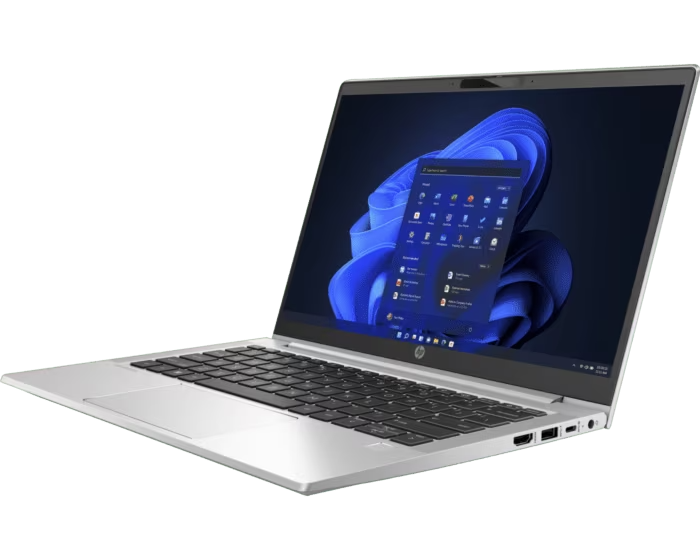
HP ProBook 430 G8 The 13.3″ compact ProBook for everyday office work
The HP ProBook 430 G8 is the entry point into HP's business laptops in a compact 13.3″ body, built for small companies and office staff who want HP business engineering without the premium price. As a refurbished laptop from ITR Bulgaria, it gives access to a sturdy, manageable work machine at an accessible cost.
Benefits
What you get from the HP ProBook 430 G8 as a compact, entry-class refurbished business laptop
13.3″ compact format
The smallest size in the ProBook 400 line. A starting weight from 1.28 kg (with the 400-nit display) and a body 15.9 mm thick with the metal or 17.7 mm with the plastic bottom cover fit easily into a bag and stay out of the way on a desk.
Two SO-DIMM slots, up to 32 GB
Two SO-DIMM slots for DDR4-3200 allow a memory upgrade up to 32 GB after purchase. For a company buying now and planning to keep the machine for years, that headroom is real.
Replaceable M.2 NVMe SSD
The M.2 NVMe SSD (2280 form factor) is user-replaceable. Storage upgrades without swapping the whole machine, which helps when capacity runs out after a year of use.
Aluminium chassis with a metal or plastic bottom cover
The lid is aluminium, the base polymer. The mix keeps weight and cost down while the lid holds up to being opened and closed many times a day, day after day.
Optional 720p camera with physical shutter
The optional HP Privacy Camera has a mechanical cover. Slide it shut to block the lens when you are off camera. A simple, visible privacy measure for everyone in the office.
USB-C with DisplayPort, two USB-A and HDMI
A USB-C port with DisplayPort 1.4 and Power Delivery, two USB-A 5Gbps ports and HDMI 1.4b. Covers an external monitor, mouse, keyboard and printer without adapters. No Thunderbolt, which is normal for the class.
45 Wh battery with HP Fast Charge
A 45 Wh battery that charges to 50% in about 30 minutes with the laptop off or in standby and an adapter of at least 65 W. Enough for a desk-based workday with the charger nearby; as fast as the HP EliteBook 830 G8, and still in line with the entry class.
Hardware security basics + TPM 2.0
HP Sure Start Gen6, Sure Sense, Sure Click and BIOSphere Gen5, plus TPM 2.0 and an optional fingerprint reader. The core of HP's business protection, in a trimmed-down form versus EliteBook.
HP Premium keyboard with optional backlight
A spill-resistant HP Premium keyboard with an optional backlight. For people who write emails and documents all day, typing comfort matters more than a spec on paper.
An accessible way into brand-name business class
As a used laptop that has passed a technical check and refurbishment, the HP ProBook 430 G8 puts a brand-name business machine at a price that makes equipping a small office realistic.
HP ProBook 430 G8: the 13.3″ compact ProBook for everyday office work
HP's business laptops sit on a clear ladder. The ProBook 400 series is the bottom rung, the accessible business line: a smaller set of Wolf Security features, simpler construction and a more reasonable price. Above it is the ProBook 600 for mainstream business, and at the top the premium EliteBook 800 with the full kit. The HP ProBook 430 G8 is the 13.3″ entry to that ladder: a compact size, the core business features and a price a small company can fit into its budget without negotiating with the supplier.
To understand who this laptop is for, it helps to know why the ProBook line exists at all. When HP split its business machines into two tiers, premium and accessible, EliteBook took the corporate top end with a more polished aluminium body and military durability testing, while ProBook stayed to do the actual work for everyone without a corporate IT budget: small companies, schools, accounting offices, new teams. The idea was straightforward, to give the heart of HP's business engineering (manageability, hardware security basics, a sturdy spill-resistant keyboard, easy access to the components) at a price that does not scare the accountant. The HP ProBook 430 G8 is exactly that in a 13.3″ body: a machine that does not try to impress on the desk, just to get the job done day after day.
Inside sits Intel's 11th generation platform (Tiger Lake), in Core i3, i5 or i7 versions, with integrated Iris Xe graphics on the i5 and i7 models (the i3 uses UHD Graphics). On select configurations HP also adds a discrete NVIDIA GeForce MX450, a small graphics reserve for lighter tasks beyond the office suite. What makes the model practical over the long run is its serviceability: two SO-DIMM slots allow a memory upgrade up to 32 GB DDR4-3200 after purchase, and the M.2 NVMe SSD is user-replaceable. The chassis combines an aluminium lid with a polymer base, a mix that keeps the weight around 1.27 kg and brings the cost down without the lid giving way under daily opening. The 45 Wh battery charges to 50% in about 30 minutes with HP Fast Charge (laptop off or in standby, adapter of at least 65 W), as fast as the HP EliteBook 830 G8, and enough for a desk-based workday.
The sticker beside the touchpad has a history too — a musical one. In 1991 Intel did something unheard of for a component maker: it began advertising the invisible. The “Intel Inside” campaign put a logo on computer cases. The effect was staggering: according to Intel data, within a year recognition of the logo among European PC buyers jumped from about a quarter at the end of 1991 to nearly four-fifths. A few years later a five-note audio signature arrived on the airwaves — the famous chime composed by Austrian musician Walter Werzowa, with the rhythm of its last four notes following the syllables of the slogan. The little decal on the HP ProBook 430 G8 is a late heir of one of the century's most successful marketing ideas.
On connectivity the HP ProBook 430 G8 covers the basics without extras: a USB-C port with DisplayPort 1.4 and Power Delivery, two USB-A 5Gbps ports, HDMI 1.4b and an audio jack. This is the first honest trade-off, there is no Thunderbolt and no RJ45 network port. Single-cable docking is possible with a compatible USB-C dock, while a wired office network will need an adapter or a higher-class model. The display is 13.3″ in the classic 16:9 ratio and comes in several variants, from a basic HD panel to an FHD IPS with an anti-glare finish. On select units HP also offers FHD IPS with HP Sure View Gen3 (an integrated 1000-nits privacy panel) that blurs the screen from side angles at the press of a button, a rarity for the entry class and useful for working with documents in open spaces.
The main trade-off is clear and comes from the positioning: the HP ProBook 430 G8 does not carry EliteBook's full package. Wolf Security comes in a trimmed-down form, the camera is 720p with a physical shutter rather than an IR camera for Windows Hello by default, and there is no vPro. If you need more, a 64 GB memory ceiling, two Thunderbolt 4 ports and broader security, look at the HP EliteBook 830 G8 from the same generation, which is one step up in price and class (it also offers Sure View and two SO-DIMM slots, but its capacity reaches 64 GB). From other brands, the direct neighbours are the Dell Latitude 3320, also a 13.3″ entry model where the differences are subtle: Dell uses a more conventional webcam module, while the spill-resistant HP Premium keyboard is the ProBook's small plus for people who type all day. The Lenovo ThinkPad E14 Gen 2 plays in the neighbouring 14″ format, more screen, but a slightly larger footprint in the bag if compactness is the priority. As a refurbished laptop from ITR Bulgaria, the ProBook 430 G8 makes sense exactly here: it puts a brand-name business machine, a used business laptop that has passed a technical check and refurbishment, at a price that makes equipping a small office realistic.
Who it suits
Scenarios where the HP ProBook 430 G8 makes the most sense
Small companies on a tight budget
An owner who needs to equip five people with reliable work machines but has no corporate IT budget. The HP ProBook 430 G8 delivers HP's brand-name business engineering without paying for premium features the office will not use.
The standard office worker
Someone whose day runs on email, Word and Excel, the occasional video call and a browser with a dozen tabs. Iris Xe and 16 GB of dual-channel memory (with room to upgrade) handle that without lag, and the 13.3″ screen sits comfortably on a narrow desk.
Students in business programmes
A student carrying the laptop between lectures, the library and home. The compact 13.3″ format and a starting weight from 1.28 kg with the 400-nit display do not weigh down a backpack, and the sturdy keyboard holds up to writing papers late into the night.
Kitting out a new office
A starting team buying its first batch of machines and wanting a uniform, easy-to-maintain fleet. Replaceable SSD and memory mean each machine can grow with the team rather than being swapped out when the drive fills up.
Model highlights
The entry rung on HP's business ladder
ProBook 400 is HP's accessible business line, below the ProBook 600 (mainstream) and EliteBook 800 (premium). The HP ProBook 430 G8 is its 13.3″, most compact model.
Intel 11th Gen (Tiger Lake) + optional MX450
Core i3 / i5 / i7 from the 11th generation, with Iris Xe graphics on i5 and i7. On select configurations, a discrete NVIDIA GeForce MX450 2 GB for lighter graphics tasks.
2× SO-DIMM up to 32 GB + replaceable SSD
Two SO-DIMM slots for DDR4-3200 (up to 32 GB) and a replaceable M.2 NVMe SSD. Serviceability that is rare in the most affordable business class.
13.3″ FHD IPS, optional HP Sure View Gen3
A 13.3″ 16:9 display with options from HD to FHD IPS with an anti-glare finish. On select units, an HP Sure View Gen3 1000-nits privacy panel against side viewing.
45 Wh battery with HP Fast Charge
A 3-cell 45 Wh battery that charges to 50% in about 30 minutes with the laptop off or in standby and an adapter of at least 65 W. No excess weight, geared toward desk work with the charger nearby.
USB-C (DP + PD), 2× USB-A, HDMI, optional Wi-Fi 6
USB-C with DisplayPort 1.4 and Power Delivery, two USB-A 5Gbps, HDMI 1.4b and optional Wi-Fi 6 (AX201). No Thunderbolt and no RJ45, which is typical for the entry class.
TPM 2.0, Sure Start Gen6, optional fingerprint
Hardware security basics: TPM 2.0, HP Sure Start Gen6, Sure Sense, Sure Click and BIOSphere Gen5. A fingerprint reader and IR camera are available as options. Availability and operation of the software protections depend on the configuration, operating system and licence.
A sound choice as a refurbished laptop
Access to HP's brand-name business engineering as a used laptop that has been refurbished, a sensible entry for companies wanting sturdy machines without a premium bill.
Refurbished by ITR Bulgaria: what value do you get?
Buying a refurbished business-class laptop makes the most sense when the device has gone through a standardised internal refurbishment process and ships with a real warranty. That is how used laptops become refurbished laptops that can be a practical and professional alternative to new budget machines, or a far more sensible purchase than new premium equivalents.
- ✓ Technical audit and cosmetic assessment to an internal standard
- ✓ Refurbishment, cleaning, quality improvement and configuration to a standard for repeat business use
- ✓ Use of original software and a prepared configuration suited to the model
- ✓ Packaging, a real warranty and model support from ITR Bulgaria
Ready to see the available units?
The HP ProBook 430 G8 is a refurbished business laptop from the accessible ProBook 400 line, compact, sturdy and delivered with a warranty from ITR Bulgaria. Browse the current stock or get in touch for help.
Additional information
Where this model fits in the series ▼
The HP ProBook 430 G8 belongs to the ProBook 400 series, HP's accessible business line, below the ProBook 600 (mainstream business) and the premium EliteBook 800. This is the entry business segment: the core business features, simpler construction and a more reasonable price. The series competes directly with the Dell Latitude 3000 and the Lenovo ThinkPad E line.
Across HP's business range there is a size ladder: HP ProBook 430 G8 (13.3″, most compact), HP ProBook 440 G8 (14″, the most popular balance), HP ProBook 450 G8 (15.6″, more screen) and HP 470 G8 (17.3″, for mostly desk-based work). The HP ProBook 430 G8 is the entry point by size for those who put compactness first.
The G8 generation uses Intel's 11th generation platform (Tiger Lake) and succeeds the HP ProBook 430 G7. For a small company the value is not the newest platform but the balance between brand-name business engineering and an accessible price, which is exactly where buying it as a refurbished laptop makes sense.
The HP ProBook 430 G8 is not ideal if… ▼
- You need Thunderbolt docking. The HP ProBook 430 G8 uses USB-C with DisplayPort and Power Delivery and supports USB-C docking, but has no Thunderbolt. For Thunderbolt docking, look at the EliteBook 800 series.
- You work on a wired network and need a built-in RJ45 port. This model has no Ethernet port. In the ProBook 600 series, the 640 G8 and 650 G8, for example, offer one; the compact 630 G8 also lacks it.
- You need more than 32 GB of memory. The ceiling here is 32 GB. The HP EliteBook 830 G8 from the same generation reaches 64 GB.
- You expect the full HP Wolf Security suite or vPro for centralised corporate management. Those are EliteBook 800 distinctions, not ProBook 400.
- You rely on an IR camera for Windows Hello by default. The standard camera is 720p with a physical shutter; IR is an option, not on every unit.
- You want a larger screen. The HP ProBook 440 G8 (14″), HP ProBook 450 G8 (15.6″) or HP 470 G8 (17.3″) are better suited.
- You need a guaranteed specific configuration (a particular CPU, the discrete MX450, a Sure View panel, an exact RAM/SSD capacity). Configurations vary, so it is important to check the specific unit.
Which size to choose among these HP models ▼
13.3″ class (HP ProBook 430 G8): the most compact in the line. A starting weight from 1.28 kg with the 400-nit display, suited to frequent carrying and narrow desks. Trade-off: less screen working space.
14″ class (HP ProBook 440 G8): the most popular balance between screen area and portability. A good starting point if you are not sure which size you need.
15.6″ class (HP ProBook 450 G8): more screen for spreadsheets and several windows at once. Bigger and heavier, for more stationary work.
17.3″ class (HP 470 G8): maximum screen area, aimed at mostly desk-based work. Rarely carried around.
Construction: the models listed are standard laptops without 360-degree hinges. The HP ProBook 430 G8 pairs an aluminium lid with a polymer base, a combination for lower weight and cost with a sturdy lid.
Alternative models ▼
Within HP:
HP ProBook 440 G8 — the 14″ neighbour in the same series and class. More screen area with the same logic and price. Choose the HP ProBook 440 G8 if compactness is not a priority; the 430 G8 if you want the smallest format.
HP EliteBook 830 G8 — a step up into the premium HP EliteBook 800 series, same generation and 13.3″ size. You gain a 64 GB memory ceiling, two Thunderbolt 4 ports, broader Wolf Security and a more polished aluminium body. Trade-off: a higher price.
HP ProBook 630 G8 — the HP ProBook 13.3″ class from the mainstream HP ProBook 600 series. Adds Thunderbolt 4 on certain configurations versus the HP ProBook 430 G8, but it also has no built-in RJ45 port. Trade-off: usually a higher price than the 400 line.
HP ProBook 430 G7 — the previous generation (Intel 10th Gen). A more affordable refurbished option. Trade-off: an older platform without the 11th generation improvements.
Cross-brand alternatives (entry business class):
Dell Latitude 3320 — a direct 13.3″ competitor from the entry Dell Latitude 3000 series. The differences are subtle: Dell uses a more conventional webcam module, while the spill-resistant HP Premium keyboard is the HP ProBook's small plus for heavy typing.
Lenovo ThinkPad E14 Gen 2 (Intel) — the accessible Lenovo ThinkPad E line, but in a 14″ format. More screen and the classic Lenovo ThinkPad keyboard, but a larger footprint. Choose the HP ProBook 430 G8 if the compact 13.3″ size matters.
Note: do not compare the HP ProBook 430 G8 with the HP EliteBook 840 G8 or Dell Latitude 7000. They are premium business class with a different target group and price.
Refurbished by ITR Bulgaria: what value do you get? ▼
The HP ProBook 430 G8 is one of the models where refurbishment makes particularly practical sense for a small business. The serviceability helps: the two SO-DIMM slots and the replaceable M.2 NVMe SSD mean memory and storage can be configured to need during preparation, rather than being fixed at the factory.
Add to that the wide reach of the ProBook series, which keeps spare parts and accessories (batteries, chargers) available on the market. After passing the technical audit and refurbishment, the model is prepared for repeat business use and comes with a real warranty and support from ITR Bulgaria. For a company equipping several workstations at once, that turns used laptops into a predictable expense rather than a risk.
Frequently asked questions ▼
Is the HP ProBook 430 G8 a good choice as a used business laptop?
Yes, when you want a compact business laptop without a premium bill. The HP ProBook 430 G8 gives HP's brand-name business engineering in the most accessible line: a sturdy body, serviceable memory and SSD, hardware security basics. As a refurbished laptop, it is a sensible entry for small companies and office staff who do not need EliteBook features.
What is the difference between the HP ProBook 430 G8 and the HP EliteBook 830 G8?
Both are 13.3″ from the 11th generation, both with two SO-DIMM slots. The HP EliteBook 830 G8 is the premium class: a 64 GB memory ceiling (versus 32 GB on the HP ProBook 430 G8), two Thunderbolt 4 ports, a broader Wolf Security platform and a more polished aluminium body. The HP ProBook 430 G8 trades some of that for a more accessible price. The choice depends on whether you need those premium features.
Does the HP ProBook 430 G8 have Thunderbolt and a network port?
No. Connectivity is USB-C with DisplayPort 1.4 and Power Delivery, two USB-A 5Gbps, HDMI 1.4b and an audio jack, with no Thunderbolt and no built-in RJ45 Ethernet. For a wired network you will need a USB adapter, and for docking a USB-C solution. This is typical for the entry business class.
Can the memory and storage be upgraded?
Yes. The HP ProBook 430 G8 has two SO-DIMM slots for DDR4-3200 memory (up to 32 GB total) and a replaceable M.2 NVMe SSD (2280 form factor). This is one of the model's practical advantages, the machine can grow with the office's needs rather than being replaced outright.
What configurations are found on the HP ProBook 430 G8?
The model is found with Intel Core i3, i5 or i7 from the 11th generation (Iris Xe graphics on i5/i7, UHD on i3), up to 32 GB DDR4-3200 memory and an NVMe SSD up to 1 TB. On select units the following may be available: a discrete NVIDIA GeForce MX450, an FHD IPS display, an HP Sure View Gen3 privacy panel (1000 nits), a fingerprint reader or an IR camera. It is important to check the specific unit.