
 EN
EN BG
BG
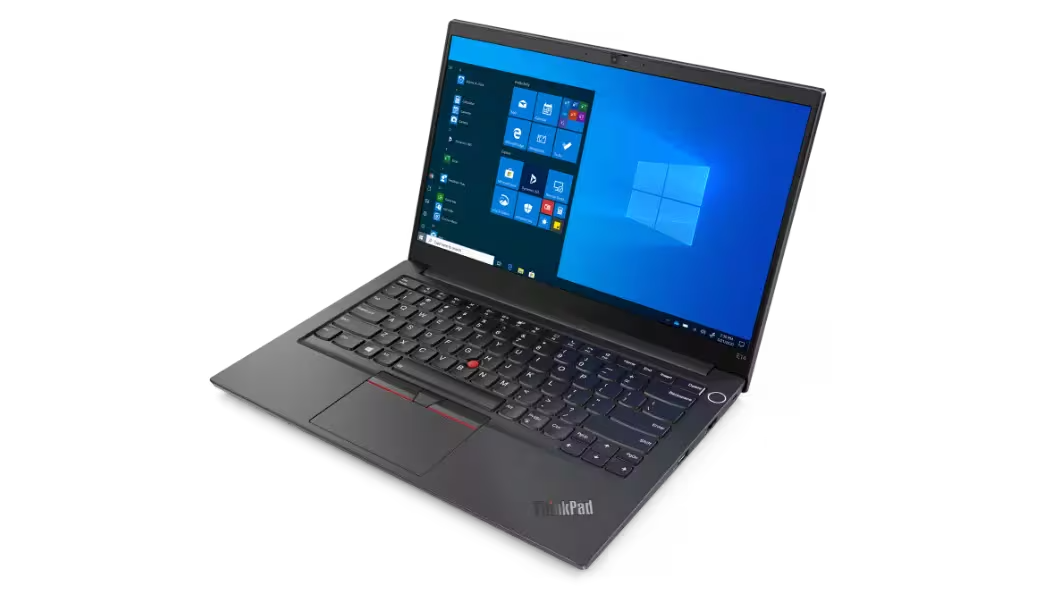
Lenovo ThinkPad E14 Gen 2 (Intel) The 14-inch entry ThinkPad that keeps the TrackPoint
The Lenovo ThinkPad E14 Gen 2 is the entry tier of the ThinkPad line — for people who want the classic ThinkPad keyboard with TrackPoint, without the premium price of the T series. As a refurbished business laptop from ITR Bulgaria, it's an affordable way into the ThinkPad ecosystem with a recognisable platform and a real warranty.
Benefits
Why the Lenovo ThinkPad E14 Gen 2 (Intel) is a sensible way into ThinkPad as a refurbished business laptop
ThinkPad keyboard with TrackPoint
The same layout, sculpted keys and the red TrackPoint in the middle — you navigate without lifting your hands off the letters. Travel is the classic 1.8 mm — the same as the T series of this generation; one of the last entry generations with the deep ThinkPad throw.
Thunderbolt 4 — unusual for entry
The Lenovo ThinkPad E14 Gen 2 (Intel) carries Thunderbolt 4 over USB-C — a rarity for the entry ThinkPad line. One cable connects a dock, external monitors and fast storage.
Full-size RJ45 Ethernet
A real RJ45 port with no dongle — handy in offices and client buildings still running wired networks. Plus two USB-A ports — one USB 3.2 Gen 1 and one USB 2.0 — and HDMI; there is no SD reader.
Replaceable memory up to 32 GB
One SO-DIMM slot for DDR4-3200, supporting up to 32 GB per Lenovo, with no soldered memory; upgrading means replacing the module. A real reserve you notice two or three years in, when the apps get heavier.
MIL-STD-810H — 12 requirements
Passes 12 military tests for vibration, shock, dust and temperature. Durability you don't expect in the entry class — the ThinkPad approach to toughness reaches down here too.
ThinkShutter camera cover
A physical shutter you slide across the 720p webcam with a finger. Privacy that doesn't depend on software — you can see with your own eyes that the lens is covered.
Serviceable, replaceable SSD
Variants with an aluminium lid over the screen are available, alongside a replaceable M.2 NVMe SSD and standardised parts. Refurbishment is technically predictable — which is why ThinkPad stays easy to maintain for years.
Tiger Lake with optional MX450
Intel Core i3/i5/i7 11th Gen with integrated Intel UHD graphics. On select configurations there's also a discrete NVIDIA GeForce MX450 for lighter graphics work.
TPM 2.0 + fingerprint reader
TPM 2.0 — firmware or a discrete chip, depending on the configuration — and a fingerprint reader built into the power button (on select configurations). You sign in with one touch, no password.
A logical pick as a refurbished laptop
ThinkPad machines are easy to service and parts are standardised — so a used laptop from this line is predictable to refurbish and ships with a real warranty from ITR Bulgaria.
Lenovo ThinkPad E14 Gen 2 (Intel): an entry ThinkPad with the classic keyboard and TrackPoint
Lenovo's business portfolio is arranged as a ladder that not every buyer notices from the outside: ThinkPad E is the entry level, ThinkPad L is mainstream, ThinkPad T is the premium workhorse, and ThinkPad X1 is the ultra-premium flagship. The ThinkPad E14 Gen 2 is the 14-inch representative of the most affordable tier. What makes it interesting is that, unlike a fair number of entry business laptops, it doesn't drop the very thing people choose ThinkPad for in the first place — the classic keyboard with the red TrackPoint and the standard ThinkPad layout stay right where they belong.
One of the most accurate descriptions of this model came from the American press: “a basic business laptop” — meant not as a rebuke but as a compliment. No flashy convertible tricks, no leather lids, no numbers invented for a press conference. There is a solid chassis that does not creak, a keyboard for which hundreds of thousands of people have switched brands, and a price that requires no sign-off from the CFO. In a world where every machine declares itself a revolution, the honest word “basic” turns out to be the rarest virtue.
That keyboard carries a history longer than most laptops on the market. The red dot in the middle — the TrackPoint — first appeared on early IBM machines in the early 1990s and survived thirty years of ThinkPad development, first under IBM and from 2005 under Lenovo, for one simple reason: it lets you move the cursor without lifting your hands off the letters. ThinkPad design never chased shelf appeal — matte black, restrained lines, nothing extra. The idea is for the machine to disappear into the work rather than draw attention to itself. The E series exists to bring exactly that feel to a more affordable price, which is why the Lenovo ThinkPad E14 Gen 2 (Intel) types and navigates like a ThinkPad even though it doesn't come from the premium tier.
A nice detail: key travel on the Lenovo ThinkPad E14 Gen 2 (Intel) is the classic 1.8 mm — the same as the famous T series from the same period. That makes the E14 Gen 2 one of the last entry generations with the old deep ThinkPad throw; the move to the shallower 1.5 mm only comes with the later E generations. The layout, the TrackPoint and the separated keys are the same too, and the backlight is optional — the typing feel is pure ThinkPad. The platform is 11th Gen Intel Core (Tiger Lake): the integrated graphics run as Intel UHD because of the single-channel memory, including on Core i5/i7. What surprises for the entry class is the connectivity — the E14 Gen 2 carries Thunderbolt 4 over USB-C (rare for the E series), a full-size RJ45 Ethernet port, two USB-A ports — one USB 3.2 Gen 1 and one USB 2.0 — and HDMI, but no SD reader. Memory sits in a single SO-DIMM slot (up to 32 GB per Lenovo, no soldered memory), and the M.2 NVMe SSD is replaceable. The 45 Wh battery charges to 80% in about an hour with a 65W USB-C charger while the laptop is switched off.
The compromises sit where you'd expect for an entry class. The Lenovo ThinkPad E14 Gen 2 (Intel) starts from about 1.59 kg and is a little thicker than a typical ultrabook — heavier than the HP ProBook 440 G8 (from about 1.38 kg) and the Dell Latitude 3420 (from about 1.52 kg), its two direct tier-1 rivals. In return, neither the ProBook 440 nor the Latitude 3420 offers a TrackPoint and a ThinkPad keyboard — and the E14 also has a full RJ45 Ethernet port, which isn't a given in the class. The chassis combines an aluminium lid that keeps the screen steady when you grab the machine one-handed with a reinforced polymer base that brings the cost and weight down — a deliberate entry choice, backed by testing against 12 MIL-STD-810H requirements. The camera is 720p with a physical ThinkShutter for privacy.
Against the premium T line, the Lenovo ThinkPad E14 Gen 2 (Intel) gives up two specific things: it doesn't carry the full ThinkShield package of the T series, and because of its single-channel memory it relies on UHD graphics. If that's exactly what you want — full enterprise security and Iris Xe with dual-channel memory — the logical step up is the Lenovo ThinkPad T14 Gen 2 (Intel), with the Lenovo ThinkPad L14 Gen 2 (Intel) sitting between the two as the mainstream option. But for a ThinkPad fan on a tight budget, or a small business standardising on a recognisable platform, the E14 Gen 2 hits the right balance. As a refurbished laptop from ITR Bulgaria it's a sensible buy: ThinkPad machines are easy to service, parts are standardised, and a used business laptop from this line comes with a technical audit and a real warranty — a far more predictable choice than a random pre-owned device.
Who it's for
Scenarios where the Lenovo ThinkPad E14 Gen 2 (Intel) makes the most sense
A ThinkPad fan on a tight budget
Someone who has typed on a ThinkPad before and wants the TrackPoint and the layout again, but can't justify a premium T or X1 price. The Lenovo ThinkPad E14 Gen 2 (Intel) delivers that feel at an affordable price.
A small business standardising on ThinkPad
A company equipping several staff at once that wants one recognisable platform — standardised parts, easy maintenance and Commercial Vantage for managing everything from one place.
An early-career professional's first business laptop
A young accountant, lawyer or administrator who needs a machine for writing, spreadsheets and video calls all day — with RJ45 for the wired office network and Thunderbolt 4 for a single cable to a monitor and dock at home.
Long-term use with room to upgrade
Someone who buys once and uses it for years. The SO-DIMM slot for RAM (up to 32 GB per Lenovo, by replacing the module) and the replaceable M.2 NVMe SSD let you expand the machine later instead of replacing it.
Model highlights
ThinkPad keyboard + TrackPoint
The classic ThinkPad layout with an optional backlight and the red TrackPoint in the middle. Travel is the classic 1.8 mm — the same as the T series; one of the last entry generations with the deep ThinkPad throw.
Thunderbolt 4 over USB-C
A full Thunderbolt 4 port — unusual connectivity for the entry ThinkPad line. Dock, external monitors and fast storage over a single cable.
RJ45 + USB-A + HDMI
A full-size RJ45 Ethernet port with no adapter, two USB-A ports — one USB 3.2 Gen 1 and one USB 2.0 — and HDMI 1.4b. There is no SD reader. A broad port set for wired office setups and older peripherals.
Replaceable memory up to 32 GB
One SO-DIMM slot for DDR4-3200, supporting up to 32 GB per Lenovo; upgrading means replacing the module. A replaceable M.2 2280 NVMe SSD with factory options up to 1 TB — a real upgrade reserve.
MIL-STD-810H — 12 requirements
Withstands 12 military tests for vibration, shock, dust, humidity and temperature. The ThinkPad approach to durability reaches the entry class too.
ThinkShutter + TPM 2.0
A physical shutter over the camera, TPM 2.0 (firmware or a discrete chip, depending on the configuration) and a fingerprint reader in the power button (on select configurations) — basic but real enterprise security.
11th Gen Intel (Tiger Lake)
Core i3/i5/i7 — integrated Intel UHD graphics, given the model's single-channel memory. On select configurations a discrete NVIDIA GeForce MX450 2 GB for lighter graphics work.
A logical pick as a refurbished laptop
Standardised parts and easy maintenance make the Lenovo ThinkPad E14 Gen 2 (Intel) predictable to refurbish. As a used laptop that has passed a technical audit, it ships with a real warranty from ITR Bulgaria.
Refurbished by ITR Bulgaria: what value do you get?
Buying a refurbished business-class laptop makes the most sense when the device has gone through a standardised internal refurbishment process and ships with a real warranty. That's how used laptops become refurbished laptops that can be a practical, professional alternative to new budget machines, or a far more sensible buy than new premium equivalents.
- ✓ Technical audit and cosmetic assessment of the device against an internal standard
- ✓ Refurbishment, cleaning, quality improvement and configuration to a standard for repeat business use
- ✓ Use of original software and a configuration prepared for the model
- ✓ Packaging, a real warranty and support for the model from ITR Bulgaria
Ready to see what's in stock?
The Lenovo ThinkPad E14 Gen 2 (Intel) is a refurbished business laptop from the entry ThinkPad E series — an affordable way into the ThinkPad keyboard and TrackPoint, tested and prepared for long-term use. Browse current availability or get in touch for help.
Additional information
Where this model fits in the series ▼
The Lenovo ThinkPad E14 Gen 2 (Intel) is the entry tier of the ThinkPad line. The portfolio hierarchy runs: ThinkPad E (entry, for small business and affordable use) → ThinkPad L (mainstream) → ThinkPad T (premium workhorse) → ThinkPad X1 (ultra-premium flagship). ThinkPad P sits apart for workstation work.
The E series' role is clear: to bring the ThinkPad feel — keyboard, TrackPoint, durability, enterprise manageability — at a more affordable price, with some deliberate compromises against the T line (a simpler chassis base, basic security instead of the full ThinkShield).
Within the generation, the Lenovo ThinkPad E14 Gen 2 (Intel) has a 15-inch sibling — the Lenovo ThinkPad E15 Gen 2 (Intel) — with the same logic but more screen area. The Lenovo ThinkPad E14 Gen 2 (Intel) succeeds the Lenovo ThinkPad E14 Gen 1 (Intel) (Intel 10th Gen, Comet Lake) and uses Intel 11th Gen (Tiger Lake).
The Lenovo ThinkPad E14 Gen 2 is not ideal if… ▼
- Minimum weight is the priority — the Lenovo ThinkPad E14 Gen 2 (Intel) starts from about 1.59 kg with an aluminium lid and a PC + ABS base, while the HP ProBook 440 G8 starts from about 1.38 kg and the Dell Latitude 3420 from about 1.52 kg. For a lighter tier-1 laptop, look at those.
- You want the full premium ThinkPad package — Iris Xe graphics with dual-channel memory, the full ThinkShield and a more serious build. Then the logical step is the Lenovo ThinkPad T14 Gen 2 (Intel) from the premium T series.
- You need a 1080p webcam — the Lenovo ThinkPad E14 Gen 2 (Intel) comes with a 720p camera and ThinkShutter, with IR for Windows Hello available as an option. For a better camera and Windows Hello, look at the premium 14-inch class.
- You're after a 2-in-1 or tablet mode — the Lenovo ThinkPad E14 Gen 2 (Intel) is a standard clamshell laptop with no 360-degree hinges. A touchscreen is available as an option, but it does not turn it into a 2-in-1. For a convertible, look at the Lenovo ThinkPad X13 Yoga or the Lenovo Yoga series.
- You need a guaranteed specific configuration (an FHD IPS panel instead of FHD TN, a particular Core i-class, a discrete MX450, a touchscreen, an IR camera or a fingerprint reader) — these depend on the unit, so it's worth checking the specific device.
Choosing the right size / form factor ▼
14-inch class (Lenovo ThinkPad E14 Gen 2 (Intel)): the balanced size for everyday business work — enough screen area for spreadsheets and documents at a starting weight of about 1.59 kg for the version with an aluminium lid and a PC + ABS base, which still carries comfortably.
15-inch class (Lenovo ThinkPad E15 Gen 2 (Intel)): more screen area for spreadsheet-heavy and multi-window work, better suited to mostly stationary desk use.
Form factor: the Lenovo ThinkPad E14 Gen 2 (Intel) is a standard clamshell laptop with no 360-degree hinges, but with an optional touchscreen. For a 2-in-1 format, look at the Lenovo ThinkPad X13 Yoga (premium) or the Lenovo Yoga series (consumer).
Chassis: an aluminium lid over the screen plus a reinforced polymer base. The lid keeps the display steady, the base brings the weight and cost down — a typical entry balance, but one that passed the MIL-STD-810H tests.
Alternative models ▼
Within Lenovo:
Lenovo ThinkPad E15 Gen 2 (Intel) — the 15-inch variant from the same generation and class. More screen area for spreadsheet work, at the cost of a little more weight. A logical pick if the priority is screen rather than carrying.
Lenovo ThinkPad L14 — a step up to the mainstream tier. Better positioned between entry and premium, with fuller enterprise manageability than the Lenovo ThinkPad E series.
Lenovo ThinkPad T14 Gen 2 (Intel) — the premium Lenovo ThinkPad T series. Iris Xe with dual-channel memory, the full ThinkShield and a more serious build. Trade-off: a higher price as a refurbished laptop.
Cross-brand alternatives (14″, entry business class, Gen 11):
HP ProBook 440 G8 — a direct tier-1 rival from HP. With a lower starting weight (from about 1.38 kg), but with no TrackPoint and no Lenovo ThinkPad keyboard. A logical pick for HP-oriented environments where lower weight matters.
Dell Latitude 3420 — the entry Dell Latitude 3000 series. With a lower starting weight (from about 1.52 kg) than the Lenovo ThinkPad E14 Gen 2 (Intel), but again without the TrackPoint and Lenovo ThinkPad layout. An alternative for companies standardised on Dell.
Note: the Lenovo ThinkPad E14 Gen 2 (Intel) is an entry-class machine — don't treat it as an equal to the premium Lenovo ThinkPad T14 or the Lenovo ThinkPad X1 Carbon flagship. Those sit in a higher business class with a different target group and price.
Refurbished by ITR Bulgaria: what value do you get? ▼
The Lenovo ThinkPad E14 Gen 2 (Intel) refurbishes predictably for the same reason ThinkPad is easy to maintain in general — standardised components, good hardware documentation, and a replaceable SSD and SO-DIMM memory. That makes the technical audit and the preparation for reuse clear and free of surprises.
As an entry ThinkPad, a refurbished Lenovo ThinkPad E14 Gen 2 (Intel) is also convenient for small companies standardising on one recognisable platform. After refurbishment, the model is prepared for repeat business use with a real warranty and support from ITR Bulgaria — that's the difference between a random used laptop and a refurbished business laptop with a verified background.
Frequently asked questions ▼
Is the Lenovo ThinkPad E14 Gen 2 a good choice as a used laptop?
Yes, and for a specific reason. ThinkPad machines are designed for a long lifecycle and easy maintenance, and the Lenovo ThinkPad E14 Gen 2 (Intel) has a replaceable SSD and a SO-DIMM memory slot. That makes refurbishment predictable. As a refurbished laptop from the entry business class, it gives you the ThinkPad keyboard, the TrackPoint and MIL-STD durability at an affordable price.
What's the difference between the Lenovo ThinkPad E14 Gen 2 (Intel) and the Lenovo ThinkPad T14 Gen 2 (Intel)?
The Lenovo ThinkPad E14 Gen 2 (Intel) is entry class, the Lenovo ThinkPad T14 is premium. The Lenovo ThinkPad T14 Gen 2 (Intel) comes with Iris Xe graphics in dual-channel memory configurations, the full ThinkShield package and a more serious build. The Lenovo ThinkPad E14 Gen 2 (Intel) keeps the same ThinkPad keyboard with TrackPoint and the classic 1.8 mm travel, but with basic security and an aluminium lid over a polymer base — in exchange for a more affordable price.
Is the Lenovo ThinkPad E14 Gen 2 (Intel) keyboard the same as the T series'?
In practice, yes — the layout, the separated keys, the red TrackPoint in the middle and even the classic 1.8 mm travel are the same as the Lenovo ThinkPad T14 Gen 2 (Intel) from the same period; the backlight is optional. You navigate with a finger in the centre without lifting your hands off the letters. The Lenovo ThinkPad E14 Gen 2 (Intel) is one of the last entry generations with the old deep ThinkPad throw, before the later E models moved to the shallower 1.5 mm.
What configurations does the Lenovo ThinkPad E14 Gen 2 (Intel) come in?
The model comes with Intel Core i3, i5 or i7 11th Gen (integrated Intel UHD graphics with single-channel memory), one SO-DIMM slot for DDR4-3200 up to 32 GB per Lenovo, and an M.2 2280 NVMe SSD with factory options up to 1 TB. On certain units you may find a discrete NVIDIA GeForce MX450, an FHD IPS panel (instead of FHD TN), a fingerprint reader in the power button, a touchscreen or an IR camera. It's worth checking the specific unit.