
 EN
 BG
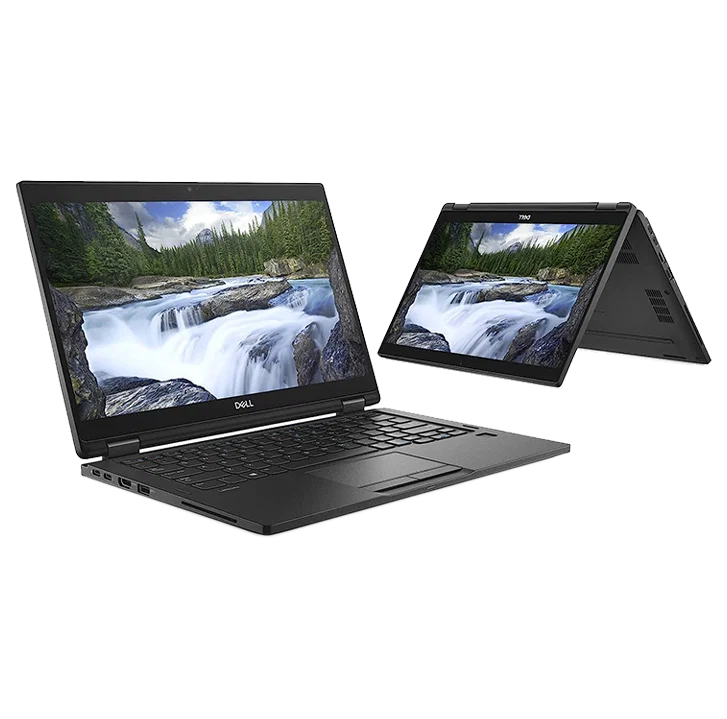
Dell Latitude 7390 2-in-1 A 13.3-inch convertible with 360° hinges, touch screen and optional IR camera — a premium Latitude in a flip-and-fold body
This is a laptop and a tablet in one body — the premium Latitude 7000 machine that flips a full 360 degrees and takes a pen. As a refurbished business laptop from ITR Bulgaria, it is a sensible pick for anyone who wants a single device for desk work, handwritten notes and presentations in tablet mode.
Benefits
What makes the Dell Latitude 7390 2-in-1 a sensible refurbished buy in the business convertible niche
A laptop and a tablet in one body
The 360-degree hinges give four modes: laptop, tent, stand and tablet. One device covers both desk work and handwritten notes.
Around 1.45 kg, ~18 mm profile
A convertible that stays light for daily carrying. Roughly 1.45 kg and an 18 mm profile mean it slips into a bag without weighing it down.
7th / 8th gen Intel Core platform
Intel Core i3/i5/i7 from the Kaby Lake / Kaby Lake-R families depending on configuration, 7th or 8th gen, with HD Graphics 620 on 7th gen and UHD Graphics 620 on 8th gen. Certain i5 and i7 configurations offer vPro, with remote management and protection on the IT department's side in a compatible, configured environment.
Options: HD camera and IR for Windows Hello
The IR camera (optional) unlocks the machine by face through Windows Hello — sit down and carry on, no password. With a physical privacy shutter to close the lens.
Touch FHD screen with pen support
A 13.3-inch Full HD touch display with wide viewing angles. Dell lists 255 nits, Corning Gorilla Glass 4 and active pen support, for handwriting and signing straight on the screen. The compatible pen is optional; check whether it is included with the specific unit.
Dell ExpressCharge: 80% in an hour
The 45 Wh and 60 Wh batteries have Dell ExpressCharge variants: about 80% in one hour with the laptop switched off, the mode enabled and a compatible battery and charger. The 60 Wh Long Life version is separate from these variants. Enough of a top-up between two meetings in different offices, without waiting for a full cycle.
Optional Thunderbolt 3, one cable
Both USB-C ports support DisplayPort, and Thunderbolt 3 is optional. A compatible dock connects an external monitor, peripherals and power over a single cable. At the desk the machine becomes a workstation in seconds.
TPM 2.0 + optional Dell ControlVault 2
Optional ControlVault 2 keeps passwords and biometric data in a separate secure chip. TPM 2.0 is standard; a fingerprint reader and smart card reader are available on certain configurations.
Carbon fiber / aluminium, MIL-STD-810G
A chassis in carbon fiber or aluminium, the Latitude 7000 materials. It passes MIL-STD-810G testing, so it holds up to daily opening and carrying over years.
Value as a refurbished laptop
As a used laptop from the premium Latitude series, the Dell Latitude 7390 2-in-1 gives access to a premium convertible at a price a new device in this class cannot match.
Dell Latitude 7390 2-in-1: a premium 13.3-inch convertible with an optional IR camera
When the 360-degree hinges reached the business class, it arrived by a roundabout route. The idea of spinning a screen all the way around and getting a tablet started on consumer machines; only afterwards did corporate laptop makers decide the flexibility was worth offering to people with real work to do. The Dell Latitude 7390 2-in-1 is exactly that moment inside the premium Latitude 7000 line, the convertible version of the 13.3-inch Dell Latitude 7390. Same series, same seriousness about security, but with hinges that open a full 360 degrees, a touch screen and an optional IR camera for Windows Hello. Unlike the clamshell version, the memory here is LPDDR3 soldered to the board — the usual trade-off for the thin convertibles of this generation, in exchange for less weight and a lower profile.
The point of this build only shows in use. On a desk it is a laptop; in the meeting room you flip it into tent mode so the screen faces the client without the keyboard in the way; on a plane you fold it into a tablet and read documents one-handed. The 13.3-inch touch display makes all four modes part of the same day, and the Gorilla Glass 4 panel with support for an optional active pen adds handwritten notes and signatures straight on the screen, for people who write during meetings instead of photographing the whiteboard. On configurations with the IR camera and Windows Hello set up, face sign-in saves typing a password in a shared room: you sit down, open the lid and carry on working.
That season's reviews described the machine with a word rarely found in the “convertible” column: workhorse. The praise gathered around the soft-touch composite surface that neither slips in the hand nor scars from travel, the Gorilla Glass 4 over the touch panel, and the active pen support for notes on the move. No circus, no fragile hinges built for shop-window display — a folding machine built by the same rules as the regular Latitude sevens. A convertible for people who buy it for the work, not the gesture.
Under the lid sits a 7th / 8th gen Intel Core platform, Kaby Lake / Kaby Lake-R with HD or UHD Graphics 620 and an optional vPro on certain i5 and i7 configurations, which lets an IT department manage it centrally. The chassis is carbon fiber or aluminium, the materials the Latitude 7000 series has used for years, because they thin the profile to about 18 mm without the panels flexing when you grab the open machine by one corner. At around 1.45 kg it stays a device you carry all day without the bag dragging. Charging runs through Dell ExpressCharge: a 45 Wh battery that, with the laptop switched off, returns about 80% in an hour over USB-C, enough between two meetings across town. Both USB-C ports support DisplayPort, and Thunderbolt 3 is optional; with a compatible dock, a single cable handles an external monitor, peripherals and power at once.
Latitude 7000 is Dell's premium business line, above the mainstream 5000 series and well above the entry 3000, and the convertibles within it were never the mass choice but the niche for people who want a corporate machine and tablet flexibility in one. That niche makes sense once you remember where convertible laptops came from. For a long time there were two approaches: the detachable tablet in the Microsoft Surface style, and the 360-degree hinges that Lenovo Yoga established. Corporate makers joined cautiously, because IT departments around the world dislike maintaining machines that look like an experiment. Dell chose the hinges and put it inside Latitude 7000 with all of its security and manageability: a carbon fiber chassis, ControlVault 2 to protect credentials, a smart card reader on certain configurations. So the Dell Latitude 7390 2-in-1 is a corporate machine that simply also folds, a lineage the Latitude line carried into its later convertible generations.
The trade-offs are honest and worth knowing up front. The memory is LPDDR3 soldered to 16 GB, with no SO-DIMM slot, so the configuration you pick stays for the life of the machine (the SSD, however, is M.2 NVMe and can be swapped). If being able to add RAM later matters, the standard Dell Latitude 7390 without hinges has SO-DIMM and is the more logical choice; it is also lighter and usually cheaper as a refurbished laptop, if you do not need tablet mode. Among the direct convertible rivals of this generation, the HP EliteBook x360 830 G5 and the Lenovo ThinkPad X380 Yoga play on the same field, premium 13.3-inch flip machines; the choice between the three often comes down to which management ecosystem a company already runs. As a refurbished business laptop from ITR Bulgaria, the Dell Latitude 7390 2-in-1 makes sense for the person who wants one device for both laptop and tablet work — a premium Latitude convertible that has passed a technical audit and preparation, with a real warranty. For companies looking at used laptops that still behave like serious business machines, it is a niche but well-aimed pick.
Who it suits
Scenarios where the convertible Dell Latitude 7390 2-in-1 makes the strongest sense
Presentations and meetings in tablet mode
A consultant showing a proposal to the other side of the table flips the screen into tent mode, so the keyboard tucks away underneath and the client sees only the screen, without you turning the whole laptop around.
Notes and signing with a pen
On the Gorilla Glass panels with an active pen you fold the machine into a tablet and write by hand during an interview or audit, mark up a contract and sign it on the spot, without a printer.
Mobile specialists who value flexibility
For someone at client sites three days a week, one device of around 1.45 kg does the job of a laptop and a tablet at once: less to carry, less to charge, less for IT to manage.
Video calls with face sign-in
On configurations with the IR camera, Windows Hello unlocks the machine at a glance at the start of the day, and the privacy shutter closes the lens when you do not need the camera on the next call.
Model highlights
Premium convertible in Latitude 7000
Latitude 7000 is Dell's premium business line, above 5000 (mainstream) and well above 3000 (entry). The Dell Latitude 7390 2-in-1 is its convertible 13.3-inch version, a rival to the HP EliteBook x360 830 G5 and the Lenovo ThinkPad X380 Yoga.
360° hinges, four modes
The hinges travels all the way to 360 degrees and locks the screen into laptop, tent, stand or tablet mode. One device changes its posture to match the task: presenting, reading, taking notes.
Intel Core 7th / 8th gen + vPro option
Core i3/i5/i7 from the Kaby Lake / Kaby Lake-R families depending on configuration, with HD Graphics 620 on 7th gen and UHD Graphics 620 on 8th gen. Certain i5 and i7 configurations offer vPro, the level of manageability and remote protection IT departments look for in fleet hardware, in a compatible IT environment.
IR camera (optional) + privacy shutter
The IR camera (optional) supports Windows Hello, face sign-in without a password. The physical privacy shutter closes the lens mechanically when the camera is not in use.
Soldered LPDDR3 up to 16 GB
Memory is LPDDR3 soldered to the board up to 16 GB, with no SO-DIMM slot, the cost of the thin profile. The configuration is chosen at purchase; on a refurbished unit it is known in advance. The SSD stays replaceable.
45 / 60 Wh ExpressCharge + optional Thunderbolt 3
45 Wh and 60 Wh batteries with Dell ExpressCharge, about 80% in an hour with the laptop switched off, the mode enabled and a compatible battery and charger. There is also a separate 60 Wh Long Life option. Both USB-C ports support DisplayPort and optional Thunderbolt 3: with a compatible dock, one cable handles monitor, peripherals and power at the desk.
Carbon fiber chassis + ControlVault 2
A chassis in carbon fiber or aluminium, tested to MIL-STD-810G. ControlVault 2 keeps credentials in a separate chip; TPM 2.0 is standard, with fingerprint and smart card by configuration.
A logical pick as a refurbished laptop
Latitude 7000 is built for a long corporate life: standardised components, good serviceability. That makes a used laptop that has been through refurbishment a predictable choice in the business convertible niche.
Refurbished by ITR Bulgaria: what value do you get?
Buying a refurbished business-class laptop makes the strongest sense when the device has gone through a standardised internal refurbishment process and arrives with a real warranty. That is how used laptops become refurbished laptops — a practical, predictable and professional alternative to new entry-level machines, or a far more sensible purchase than new premium equivalents.
- ✓ Technical audit and cosmetic assessment of the device according to an internal standard
- ✓ Refurbishment, cleaning, quality improvement and configuration to standard for repeat business use
- ✓ Use of original software and a prepared configuration appropriate to the model
- ✓ Packaging, real warranty and ongoing support for the model from ITR Bulgaria
Ready to browse available units?
The Dell Latitude 7390 2-in-1 is a refurbished business laptop from the premium Latitude 7000 series — a premium convertible, verified and prepared for corporate use. Browse current stock or get in touch for assistance.
Additional information
Where the Dell Latitude 7390 2-in-1 fits in the series ▼
The Dell Latitude 7390 2-in-1 is the convertible version of the 13.3-inch Dell Latitude 7390 from the premium Latitude 7000 series. In the Latitude hierarchy, 7000 sits above 5000 (mainstream business) and well above 3000 (entry business), and the convertibles within it are the niche for people who want a corporate machine and tablet mode in one body.
Against the standard Dell Latitude 7390 the difference is structural, not just cosmetic: 360-degree hinges, active pen support, and LPDDR3 memory soldered to the board. A touch screen is also available on certain configurations of the standard model, which has a SO-DIMM slot for RAM upgrades. It is a swap — you lose the RAM upgrade option and gain the convertible form and tablet mode; the SSD stays replaceable. Less weight is not a proven gain: the standard 7390 starts from 1.17 kg according to Dell, while the 2-in-1 tested by Notebookcheck weighed 1.442 kg.
In the wider picture, the Dell Latitude 7390 2-in-1 is the direct convertible rival of the HP EliteBook x360 830 G5 and the Lenovo ThinkPad X380 Yoga from the same generation. The next step in Dell's convertible line is the Dell Latitude 7400 2-in-1.
The Dell Latitude 7390 2-in-1 is not ideal if… ▼
- You want to add RAM later — the memory here is LPDDR3 soldered up to 16 GB, with no slot. The standard Dell Latitude 7390 (without 360-degree hinges) has SO-DIMM and is the more logical choice for upgrades.
- You do not need touch, a pen or 360-degree hinges — then the clamshell Dell Latitude 7390 is lighter, usually cheaper as a refurbished laptop, and without convertibility you would not use.
- You need discrete graphics for video editing or 3D — the integrated HD Graphics 620 on 7th gen Core or UHD Graphics 620 on 8th gen is enough for office tasks, but for heavy graphics look at the Dell Precision range.
- You want a 14- or 15-inch screen for more working space — the Dell Latitude 7490 (14″) from the same generation is a roomier standard laptop.
- You need a guaranteed specific configuration (CPU, RAM, SSD, IR camera, pen, smart card) — options vary, so check the specific unit before buying.
Choosing the right size and form factor ▼
The form factor is the real question with this model. The Dell Latitude 7390 2-in-1 is a convertible with 360-degree hinges, a laptop that folds into a tablet. If tablet mode, the touch screen and a pen matter to you, this is exactly where the model makes sense.
If you want a standard laptop without 360-degree hinges, the Dell Latitude 7390 is the same series and size in a clamshell build: lighter, with SO-DIMM memory for upgrades, and usually cheaper as a refurbished laptop.
The 13.3-inch size is the compact end of Latitude 7000, handy for frequent travel. For more screen area from the same generation, the 14-inch Dell Latitude 7490 (a standard laptop) is the more logical choice.
Other convertibles: if you are open to a different brand in the same flip-and-fold niche, the HP EliteBook x360 830 G5 and the Lenovo ThinkPad X380 Yoga are the direct 13.3-inch rivals.
Alternative models ▼
Within Dell:
Dell Latitude 7390 is the standard version without 360-degree hinges. For those who do not want a convertible: lighter, with SO-DIMM memory for upgrades, and usually cheaper as a refurbished laptop. You lose tablet mode and active pen support.
Dell Latitude 7400 2-in-1 is the next-generation convertible. A more current platform, usually at a higher price as a refurbished laptop. A logical choice if you prefer a newer generation.
Dell Latitude 5290 2-in-1 is a mainstream business convertible, a more affordable class. Simpler build and positioning than the 7000 series, but the same convertible idea.
Cross-brand alternatives (13.3″ premium convertible, same generation):
HP EliteBook x360 830 G5 is HP's direct premium convertible in the 13.3-inch class. Similar profile and security, a different management ecosystem (HP versus Dell). Logical if your organisation runs HP infrastructure.
Lenovo ThinkPad X380 Yoga is the direct premium Lenovo ThinkPad convertible. The classic Lenovo ThinkPad keyboard and TrackPoint, the same convertible idea. The choice often comes down to brand habit and the company ecosystem.
Note: do not treat the Dell Latitude 7390 2-in-1 as equivalent to the Dell Latitude 3390 2-in-1 or Dell Latitude 5290 2-in-1; they sit in a different, lower business class and serve a different audience.
Refurbished by ITR Bulgaria: what value do you get? ▼
With the Dell Latitude 7390 2-in-1, refurbishment by ITR Bulgaria has a clear logic. The Latitude 7000 series is built with a long corporate life cycle in mind: components are standardised, documentation is available, and the construction allows professional refurbishment with a predictable result.
After the process, the used laptop is prepared for repeat business use: technical audit, cleaning, configuration, original software and packaging with a real warranty. On a convertible this matters even more: the hinges, the touch screen and the battery are checked before the device reaches you. It is the difference between an unverified second-hand laptop and a refurbished business laptop with real support from ITR Bulgaria.
Frequently asked questions ▼
Is the Dell Latitude 7390 2-in-1 a good choice as a used laptop?
Yes, if you need a convertible. This is a high-end 13.3-inch flip machine from the premium Latitude 7000 series, built for long corporate use, which makes it well suited to refurbishment. As a refurbished laptop it gives access to a class of convertible that a new device cannot match at the same price.
What is the difference between the Dell Latitude 7390 2-in-1 and the standard Dell Latitude 7390?
The form factor. The 2-in-1 has 360-degree hinges, a touch screen and pen support, but the memory is LPDDR3 soldered up to 16 GB (no upgrade). The standard Dell Latitude 7390 is a clamshell without 360-degree hinges, with SO-DIMM memory for upgrades and usually lighter. The choice depends on whether you need tablet mode or upgrade headroom.
Can I upgrade the memory on the Dell Latitude 7390 2-in-1?
No. The memory is LPDDR3 soldered to the board up to 16 GB, with no SO-DIMM slot. The configuration is chosen at purchase and stays for the life of the machine. The SSD, however, is M.2 NVMe and can be replaced or increased.
What configurations does the Dell Latitude 7390 2-in-1 come in?
The model comes with Intel Core i3, i5 or i7 from the Kaby Lake / Kaby Lake-R families, 7th or 8th gen depending on configuration (some i5/i7 with vPro), 8 or 16 GB of LPDDR3 memory, and an M.2 NVMe SSD of varying capacity. The 13.3-inch FHD touch screen has Gorilla Glass 4 and support for an optional active pen. The IR camera for Windows Hello, the fingerprint reader and the smart card reader depend on the configuration. It is worth checking the specific unit.