
 EN
 BG

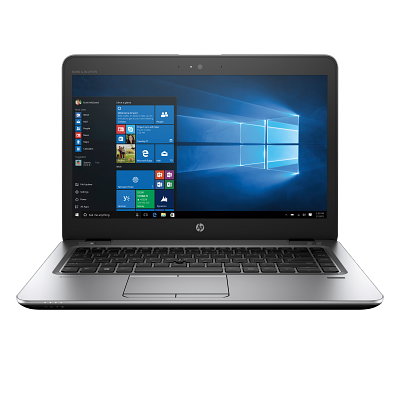
HP EliteBook 840r G4 The in-between EliteBook: 8th-gen Kaby Lake-R options inside the proven 840 G4 chassis
The HP EliteBook 840r G4 is the refresh of the HP EliteBook 840 G4: it offers newer 8th-gen Kaby Lake-R processors in the older magnesium-and-aluminium body, and dual-core 7th-gen Core i5 versions also exist. For a buyer who wants a newer platform but values the legacy ports and the more affordable tier, it is a deliberate pick as a refurbished business laptop.
Benefits
Why the 'r' refresh of the HP EliteBook 840 G4 makes sense for a specific buyer, bought as a refurbished premium business laptop
'r' means 8th-gen options in a proven base
The letter 'r' marks a refresh of the HP EliteBook 840 G4: the chassis stays from the fourth generation, and quad-core 8th-gen Intel Kaby Lake-R chips join the platform. Dual-core 7th-gen Core i5 versions are also offered. A newer platform without the premium markup of the redesign.
Four cores with 8th-gen Core
Where the HP EliteBook 840 G4 ran dual-core 7th-gen chips, the HP EliteBook 840r G4 adds quad-core options such as the i5-8250U and i7-8550U. More threads for running several business apps in parallel. Dual-core Core i5 versions are also offered.
Magnesium-and-aluminium chassis
Unlike the aluminium HP EliteBook 840 G5, the HP EliteBook 840r G4 combines magnesium alloy and aluminium. Magnesium keeps weight around 1.48 kg, aluminium adds rigidity, and the build passes MIL-STD-810G durability testing.
VGA, DisplayPort and SD, kept from the G4
VGA output, full-size DisplayPort 1.2, a drop-jaw RJ45 jack and an SD reader. If meeting rooms still run VGA projectors and wired networks, these ports save you adapters every day.
Two SO-DIMM slots, up to 32 GB DDR4
Two SO-DIMM slots allow a real memory upgrade to 32 GB after purchase, and the M.2 NVMe SSD is replaceable. The two SO-DIMM slots are kept on the 840 G5, G6 and G8 as well.
Intel HD or UHD Graphics 620
Intel UHD Graphics 620 with 8th-gen Core and HD Graphics 620 with 7th-gen. For light graphics work, the application's requirements matter; for two external monitors, a compatible dock and the supported resolutions.
51 Wh battery with HP Fast Charge
HP Fast Charge returns up to 50% in about 30 minutes with the laptop off or in standby and an adapter of at least 65 W, handy between two meetings. The 3-cell 51 Wh battery is serviceable, which extends the model's life as a refurbished laptop.
USB-C with video output and docking
The USB-C port with DisplayPort video output and power input allows one-cable docking with a compatible dock: display, network and charging at once. Uncommon for a model that otherwise keeps the classic full port set.
HP Wolf Security and TPM 2.0
Hardware-level business security: HP Sure Start Gen4 (BIOS protection), Sure Run and Sure Recover on 8th-gen Core models, Sure Click on supported platforms and applications, and a discrete TPM 2.0. Managed centrally through the HP Manageability Integration Kit in a compatible IT environment.
Sensible value as a refurbished laptop
As a used laptop that has passed a technical audit and refurbishment, the HP EliteBook 840r G4 opens up the EliteBook tier at a lower price. HP marks the memory, drive, wireless module and battery as customer-serviceable.
HP EliteBook 840r G4: the 'r' refresh of the HP EliteBook 840 G4, with a magnesium-and-aluminium chassis and 8th-gen Core options
The HP EliteBook 840r G4 is a model that's easy to misread, and the letter 'r' is the reason. It marks a refresh of the HP EliteBook 840 G4: the chassis stays from the fourth generation, and 8th-gen Intel Kaby Lake-R chips join the range. There are also dual-core versions with a 7th-gen Core i5. To understand why HP bothered with an in-between model like this, look at what was happening to the EliteBook 800 line at the time. The fifth generation (HP EliteBook 830 G5 / 840 G5 / 850 G5) was the biggest redesign of the series since its creation: a new unibody body, thinner bezels, better panels, and prices rose to match. The 840r G4 filled the gap left below it, putting the newer chips into the proven older base at a more sensible price. A less obvious detail is the build itself: unlike the aluminium 840 G5, the 840r G4 combines magnesium alloy and aluminium in its chassis.
That is what makes it a transitional model for the buyer who knows what they are after. Along with the older shape, the HP EliteBook 840r G4 kept the VGA output, the full-size DisplayPort 1.2 and the full-size SD reader that the G5 redesign dropped. It also has a drop-jaw RJ45 Ethernet jack; the G5 keeps wired networking too, but uses HDMI instead of separate VGA and DisplayPort outputs. If your meeting rooms still run VGA projectors and part of the network is wired, that isn't nostalgia; it saves you adapters and docks in daily use. For a team replacing ageing HP EliteBook 840 G4 machines, the switch is almost painless: the same docks, chargers and accessories keep fitting, only with a faster processor underneath.
Hybrids of this kind are rare in catalogs, which is why the HP EliteBook 840r G4 is remembered. HP's logic was pragmatic to the point of elegance: the new G5 generation arrived pricier, and many firms wanted the modern quad-core processors without the premium package. The solution — the new cores in the familiar, development-amortized G4 chassis, moreover keeping things the G5 had already discarded: a VGA port for old projectors, a full-size card reader, a classic hard-drive option. Transitional models rarely become stars, but they are the ones that patch real holes in real budgets.
The platform jump is real on the quad-core configurations, and you feel it. Where the HP EliteBook 840 G4 ran dual-core 7th-gen chips, the HP EliteBook 840r G4 adds quad-core Kaby Lake-R options (i5-8250U, i7-8550U), which means more threads for running several business apps at once; dual-core 7th-gen Core i5 versions are also offered. Memory is 2× SO-DIMM up to 32 GB DDR4 (2400 MHz with 8th-gen Core, 2133 MHz with 7th-gen), a real post-purchase SO-DIMM upgrade, and the M.2 NVMe SSD is replaceable too. The documented graphics are integrated Intel UHD Graphics 620 with 8th-gen Core or HD Graphics 620 with 7th-gen. The chassis is where HP put engineering thought. The magnesium alloy keeps weight around 1.48 kg and absorbs flex, while aluminium adds rigidity across the lid. The combination passes MIL-STD-810G durability testing and still feels solid in the hand years later, not hollow. Add a 51 Wh battery with HP Fast Charge (up to 50% in about 30 minutes with the laptop off or in standby and an adapter of at least 65 W) and a USB-C port with DisplayPort video output and power input for one-cable docking with a compatible dock.
To be straight about it, the HP EliteBook 840r G4 is not the thin modern laptop. It is thicker (around 19 mm), heavier than the redesigned G5, and the listed HD and FHD panels are modest on brightness, at 220 nits per QuickSpecs. If you want the slimmer silhouette with narrower bezels, the direct choice is the HP EliteBook 840 G5. Among other brands in the same 14-inch premium class and era, the Dell Latitude 7490 offers a carbon-fibre option that feels lighter in the hand, while the Lenovo ThinkPad T480 brings Power Bridge, a swappable second battery for people who stay out in the field all day without a socket. As a refurbished business laptop, though, the 840r G4 has concrete advantages: HP marks the memory, drive, wireless module and battery as customer-serviceable, parts for the HP EliteBook 840 platform are widely available, and HP backs the model with a long BIOS and driver line. That keeps this used laptop easy to support for years, not just a pre-owned machine but a tested, refurbished branded business laptop with a real warranty from ITR Bulgaria.
Who it's for
Scenarios where the HP EliteBook 840r G4 makes the most sense
An IT team replacing ageing HP EliteBook 840 G4 units
A company that already standardised on the HP EliteBook 840 G4, with the same docks, chargers and cases. The HP EliteBook 840r G4 fits the existing kit but offers quad-core processor options to handle newer software, without swapping out all the peripherals.
Office work with VGA projectors and wired LAN
Someone who plugs into a meeting room with an old VGA projector and wired Ethernet every week. The VGA output and drop-jaw RJ45 jack mean the presentation starts without hunting for an adapter five minutes before the meeting.
Light graphics work and external monitors
A user editing photos, viewing CAD drawings or driving two external monitors. The model uses integrated Intel HD or UHD Graphics 620 depending on the processor, so check the applications' requirements and the complexity of the projects. Two external monitors are possible with a compatible dock and suitable resolutions; for heavier graphics work, compare a specific mobile workstation.
A buyer who knows the EliteBook variants
Someone who already understands the difference between the G4, G5 and Aero and deliberately wants the richer port set and the SO-DIMM upgrade. For them the HP EliteBook 840r G4 is not a compromise but a targeted choice at a lower price.
Model highlights
'r' = Kaby Lake-R refresh of the G4
A refresh of the HP EliteBook 840 G4: it keeps the fourth-generation chassis but adds Intel Core 8th-gen (Kaby Lake-R) options; dual-core 7th-gen Core i5 versions are also offered. A transitional model between the G4 and the redesigned G5.
Quad-core i5-8250U / i7-8550U
On the matching configurations, 8th-gen Kaby Lake-R brings four cores instead of the two on the 7th-gen original HP EliteBook 840 G4. Integrated Intel UHD Graphics 620.
Magnesium + aluminium chassis
Hybrid body of magnesium alloy and aluminium, 18.9 mm thick without a touchscreen or 20.2 mm with one, starting weight from 1.5 kg. Passes MIL-STD-810G durability testing.
Rich port selection
VGA, DisplayPort 1.2, drop-jaw RJ45 Ethernet, SD reader, 2× USB-A 3.0 and 1× USB-C with DisplayPort Alt Mode and power input. Legacy and modern outputs in one machine.
SO-DIMM up to 32 GB + M.2 NVMe
Two SO-DIMM slots for up to 32 GB DDR4 (2400 MHz with 8th-gen Core, 2133 MHz with 7th-gen) and a replaceable M.2 NVMe SSD. A real post-purchase upgrade, with no soldered memory.
Intel HD / UHD Graphics 620
HD Graphics 620 with 7th-gen Core or UHD Graphics 620 with 8th-gen. For office and light graphics work, depending on the applications' requirements.
51 Wh battery and FHD IPS display
3-cell 51 Wh battery with HP Fast Charge (up to 50% in about 30 min with the laptop off or in standby and an adapter of at least 65 W). The listed 14″ 16:9 panels are HD or FHD, with a nominal 220 nits; the FHD variants are IPS and include a touch option.
HP Wolf Security + optional 720p HD camera
HP Sure Start Gen4, Sure Run and Sure Recover on 8th-gen Core models; Sure Click on supported platforms and applications, plus TPM 2.0. An optional 720p HD camera for video calls; versions without a camera are also offered.
Refurbished by ITR Bulgaria: what value do you get?
Buying a refurbished business-class laptop makes the strongest sense when the device has gone through a standardised internal refurbishment process and arrives with a real warranty. That is how used laptops become refurbished laptops — a practical, predictable and professional alternative to new entry-level machines, or a far more sensible purchase than new premium equivalents.
- ✓ Technical audit and cosmetic assessment of the device according to an internal standard
- ✓ Refurbishment, cleaning, quality improvement and configuration to standard for repeat business use
- ✓ Use of original software and a prepared configuration appropriate to the model
- ✓ Packaging, real warranty and ongoing support for the model from ITR Bulgaria
Ready to browse available units?
The HP EliteBook 840r G4 is a refurbished business laptop from the EliteBook 800 line: an 8th-gen platform inside the proven HP EliteBook 840 G4 chassis, tested and delivered with a warranty from ITR Bulgaria. Browse current stock or get in touch for help.
Additional information
Where HP EliteBook 840r G4 fits in the series ▼
The HP EliteBook 840r G4 belongs to the EliteBook 800 series, HP's premium business line, positioned directly against the Dell Latitude 7000 and the Lenovo ThinkPad T. Below it sit the ProBook 600 (mainstream) and ProBook 400 (entry business); above it, the convertible and ultralight flagships of the EliteBook x360 1000 and HP Elite Dragonfly lines.
What makes the HP EliteBook 840r G4 unusual is that it is not a "generation" in the usual sense. It is a refresh of the HP EliteBook 840 G4, released alongside the debut of the fifth generation (HP EliteBook 830/840/850 G5). Where the G5 was a full redesign with a slimmer body and higher prices, the HP EliteBook 840r G4 kept the proven fourth-generation shape and added quad-core Kaby Lake-R options from the 8th generation while retaining dual-core 7th-gen Core i5 versions.
So in practice the HP EliteBook 840r G4 sits between two generations: newer than the HP EliteBook 840 G4 on platform in the quad-core configurations, but older than the HP EliteBook 840 G5 on chassis and design. It is a deliberate in-between model, for the buyer who values the richer port set and the more affordable tier rather than the newest shape.
HP EliteBook 840r G4 is not ideal if… ▼
- You want the thin modern silhouette with narrower bezels and less weight. For that, the direct choice is the HP EliteBook 840 G5 (the redesigned fifth generation).
- You make minimal weight a priority. The starting weight from 1.5 kg and roughly 19 mm non-touch body are more than the ultralight 14-inch models from later generations.
- You need 2-in-1 / tablet mode. The HP EliteBook 840r G4 is a standard clamshell laptop with no 360-degree hinges. There are touch FHD configurations, but for a convertible, look at the EliteBook x360 line.
- You expect serious discrete graphics for video editing, 3D or CAD loads. The documented graphics are integrated Intel HD/UHD 620; for heavy work, the HP ZBook line is the better fit.
- You rely on high screen brightness. The listed HD and FHD panels have a nominal 220 nits. Choosing an FHD or touch version does not by itself mean a brighter panel.
- You need a precisely defined configuration: processor, resolution, touchscreen, camera or WWAN. Check the equipment of the specific unit; options from other EliteBook generations do not automatically carry over to the 840r G4.
Choosing the right size and form factor ▼
14-inch class: the HP EliteBook 840r G4 sits in the size that has long been the most balanced for mobile business users, with enough screen area for documents and spreadsheets at a weight that stays bearable for daily carrying.
Construction: a hybrid body of magnesium alloy and aluminium. Magnesium is lighter than aluminium at comparable strength, which is why the machine holds around 1.48 kg without flexing when you pick it up by one corner. Aluminium across the lid adds rigidity. The chassis passes MIL-STD-810G durability testing and is about 19 mm thick, chunkier than the redesigned G5 but richer in ports.
Display: 14″ 16:9. HP lists HD 1366×768 and FHD IPS 1920×1080 panels, including a touch FHD IPS version with Gorilla Glass 4, all with a nominal brightness of 220 nits.
If you want the newer body: the HP EliteBook 840 G5 is the redesign in the same 14-inch class, with a slimmer shape and narrower bezels, at the cost of some of the legacy ports.
Alternative models ▼
Within HP:
HP EliteBook 840 G4 — the original base. Same chassis and ports, but with dual-core 7th-gen processors. A more affordable refurbished option if the quad-core platform isn't a priority.
HP EliteBook 840 G5 — the next generation and a full redesign: a slimmer unibody body, narrower bezels, better panels. Trade-off: some legacy ports (such as VGA) were dropped. The pick if you want the more modern shape.
HP EliteBook 840 G6 — a generation above the G5, on an 8th-gen Whiskey Lake platform and the same slim design. A more current refurbished option, usually at a higher price.
Cross-brand alternatives (14″, premium business class, same era):
Dell Latitude 7490 — a premium 14-inch Latitude from the same period, with a carbon-fibre option that feels lighter in the hand. Trade-off: fewer legacy video outputs compared with the port-rich HP EliteBook 840r G4.
Lenovo ThinkPad T480 — a classic 14″ Lenovo ThinkPad with a swappable external battery and an optional internal one. With both fitted, Power Bridge lets you swap the external battery without shutting down, provided the internal one works and is charged. A strong pick for people who stay out in the field all day without a socket. Trade-off: a denser build and a different design style.
Note: don't compare the HP EliteBook 840r G4 with the HP ProBook 400 or Dell Latitude 3000 line; those sit in a different, mainstream/entry business class with a different target group.
Refurbished by ITR Bulgaria: what value do you get? ▼
The HP EliteBook 840r G4 is a model where refurbishment has clear practical logic. HP marks the memory, drive, wireless module and battery as customer-serviceable, which means the components most often replaced during refurbishment are accessible without special tooling. That makes the technical audit and consumable replacement straightforward.
On top of that comes the breadth of the HP EliteBook 840 platform on the market: because the HP EliteBook 840 G4 and HP EliteBook 840r G4 share a chassis, original batteries, docks and chargers are widely available even years after the model. That makes the HP EliteBook 840r G4 a practical used laptop with long-term support. After it passes refurbishment, the model is prepared for repeat business use and comes with a real warranty and support from ITR Bulgaria.
Frequently asked questions ▼
What does the "r" mean in HP EliteBook 840r G4?
The "r" marks this as a refresh of the HP EliteBook 840 G4. The chassis stays from the fourth generation, and quad-core 8th-gen Intel Kaby Lake-R chips join the range. Dual-core 7th-gen Core i5 versions are also offered. In practice, the 8th-gen Core versions offer a newer platform in a familiar shape.
What's the difference between the HP EliteBook 840r G4 and the HP EliteBook 840 G5?
The HP EliteBook 840 G5 is the next full generation and a major redesign: a slimmer unibody body, narrower bezels, better panels, and a higher price at launch. The HP EliteBook 840r G4 keeps the older, thicker and more port-rich body (with VGA, DisplayPort and an SD reader) but gains similar 8th-gen platform options alongside dual-core 7th-gen Core i5 versions. The choice depends on whether you prioritise the more modern shape (G5) or the legacy ports and more affordable tier (HP EliteBook 840r G4).
Can the memory and storage be upgraded?
Yes. Memory is on two SO-DIMM slots supporting up to 32 GB DDR4 (2400 MHz with 8th-gen Core, 2133 MHz with 7th-gen), and storage is M.2 NVMe SSD, both replaceable. HP marks the memory, drive, wireless module and battery as customer-serviceable, which makes upgrades and maintenance easier.
Does the HP EliteBook 840r G4 have discrete graphics?
The QuickSpecs and the service manual for the HP EliteBook 840r G4 list integrated Intel UHD Graphics 620 with 8th-gen Core and HD Graphics 620 with 7th-gen. The Radeon RX540 is not among the options described there; if an offer lists such graphics, ask for confirmation of the exact model and configuration.
Is the HP EliteBook 840r G4 a good choice as a used laptop?
Yes, for a specific buyer profile. As a refurbished laptop from the EliteBook tier, the HP EliteBook 840r G4 gives access to business features (HP Wolf Security, TPM 2.0, a serviceable chassis) at a more sensible price than a new model. It is especially logical for companies already running the HP EliteBook 840 G4 that want a faster processor without replacing docks and accessories. It comes with a real warranty from ITR Bulgaria.