
 EN
 BG
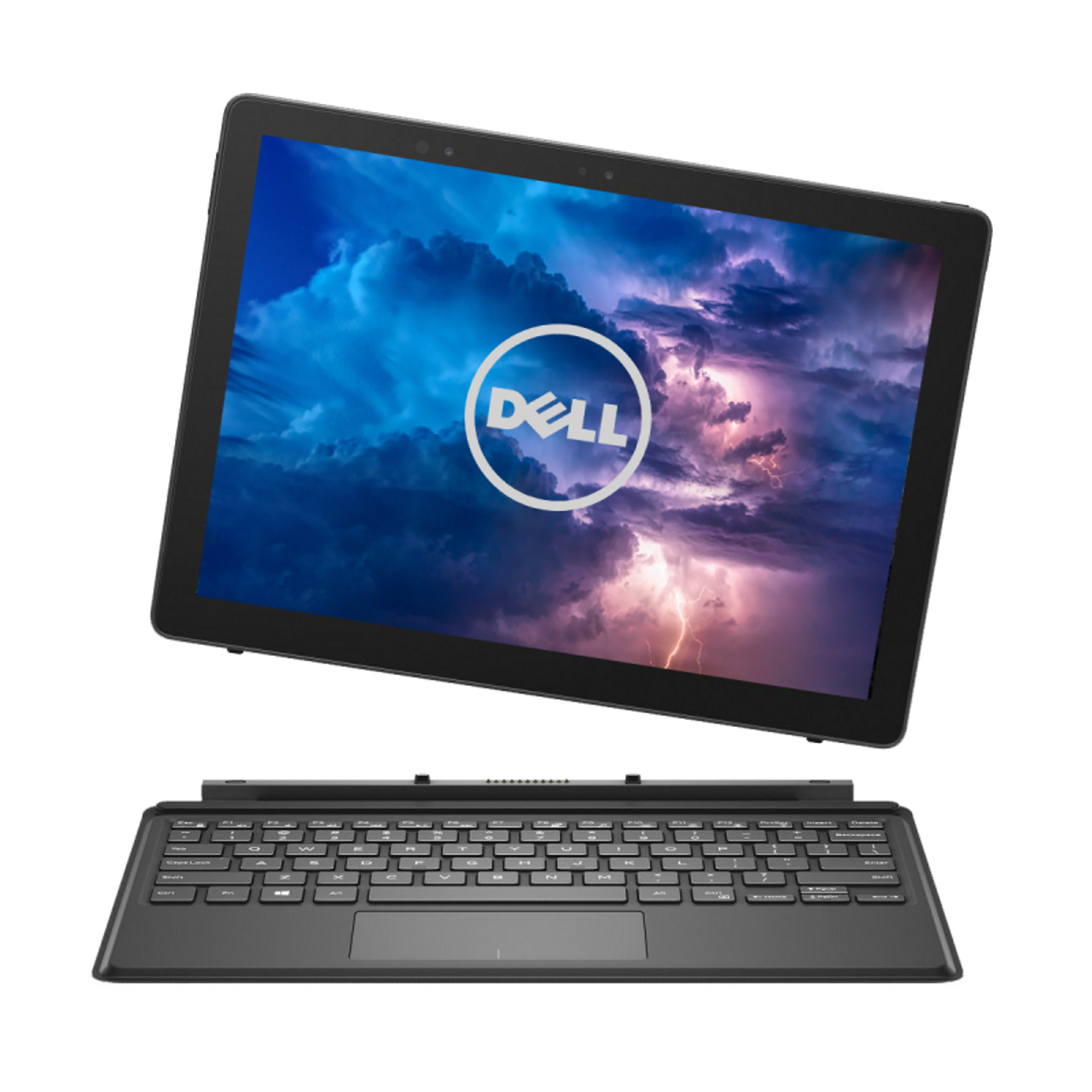
Dell Latitude 5290 2-in-1 12.3-inch detachable business tablet with a 3:2 screen from the Latitude 5000 series
The Dell Latitude 5290 2-in-1 is not a regular laptop — the keyboard detaches completely and leaves a clean 12.3-inch tablet with a magnesium body. It is a detachable device for people who work as much in hand as at a desk: in the field, in presentations and when signing documents. As a refurbished business laptop from ITR Bulgaria, it is a sensible choice for companies that want a small fleet of mobile 2-in-1 devices from a known brand, backed by a real warranty.
Benefits
Why the Dell Latitude 5290 2-in-1 makes sense as a refurbished detachable business tablet
The keyboard detaches fully
The Travel Keyboard clips on magnetically and pulls off in one motion, leaving a clean tablet — unlike convertibles, where the hinges only folds back and the keyboard stays attached.
3:2 screen — more of the page
A 12.3-inch FHD+ display (1920×1280) in a 3:2 ratio — taller than the usual 16:9. You see more lines at once when reading a contract or scanning a long table.
~0.85 kg for the tablet alone
A magnesium body around 9.8 mm thick keeps the tablet under a kilogram. You carry it in one hand all day in the field, without the weight of a laptop in a bag.
IR camera + privacy shutter
An optional IR camera for face sign-in via Windows Hello, plus a physical lens shutter. There is also an 8MP rear camera for photographing documents and objects on site.
ExpressCharge — about 80% in an hour
Batteries of 31.5 or 42 Wh with Dell ExpressCharge; there is also a 42 Wh Long Cycle Life version. With a compatible battery and ExpressCharge mode enabled, the charge reaches about 80% in an hour, and a full charge takes about two hours with the tablet switched off. Enough to top up between two meetings without waiting for a full cycle.
Intel 8th gen + vPro option
Intel Core 8th gen (Kaby Lake-R) with UHD 620 graphics on most units. The vPro configurations (i5-8350U, i7-8650U) allow centralised IT management of the company fleet.
2× USB-C + microSD
The tablet itself has one USB-A port, two USB-C ports for charging, video and peripherals, and a microSD reader. A flash drive plugs straight into the tablet, without attaching the keyboard.
Business security in a tablet
TPM 2.0 and optional Dell ControlVault 2 for data and credential protection. An optional fingerprint reader on the back of the tablet, separate from the power button and an optional smart card reader — features a pure consumer tablet rarely carries.
The SSD is upgradeable
An M.2 NVMe SSD up to 1 TB — unlike the soldered memory, the drive can be swapped and enlarged. During refurbishment at ITR Bulgaria the capacity is matched to the use case.
Value as a refurbished laptop
As a used business laptop, the detachable Latitude gives access to a Dell 2-in-1 device at a more reasonable price than a new equivalent in the same class.
Dell Latitude 5290 2-in-1: the detachable tablet with a 3:2 screen in the mainstream class
Detachable business tablets are a rare category. On these, the keyboard does not fold back — it comes off completely, leaving a clean tablet in your hand. The class started with the Microsoft Surface Pro, and Dell, HP and Lenovo then built their own corporate versions for companies that wanted a tablet, but with the manageability and security of a business laptop. The Dell Latitude 5290 2-in-1 is exactly that — Dell's answer in a 12.3-inch format: a 3:2 screen, a magnesium body and a tablet that weighs under a kilogram on its own. This is a mainstream Latitude for people who work as much at a desk as in hand.
The first thing you notice is the form. You clip on the Travel Keyboard with magnets, press the tablet's bottom edge gently onto the desk and the integrated kickstand opens on its own. Then you set a comfortable angle for typing. Pull the keyboard off and you walk away with a device that weighs about as much as a thick book. The screen is 3:2 rather than 16:9 — taller and squarer. In practice that means more lines at once: reading a contract, reviewing a long table or working through a PDF, you see more of the page without scrolling. For someone who reads and signs documents on the move, that difference shows up every day.
The construction's most memorable detail is the spring-loaded kickstand. Press the edge — and it pops out by itself, unfolds smoothly and settles at the chosen angle, like the priciest tablets of the era. The model's reviews ran under a headline that says it all: “Made to Last.” The magnesium frame, the stand's firm hinges and the keyboard that clicks on in one motion explain the nickname. Dell was building a Surface Pro answer for people who drop things more often than they admit — which is exactly why the machine has aged with dignity.
The body is magnesium alloy, not aluminium, and that is a deliberate choice. Magnesium is lighter at the same strength, which is how the tablet stays under a kilogram at around 9.8 mm thick without flexing when you grab it by one corner. The build passes MIL-STD-810G testing — the standard used to check resistance to shock, vibration and temperature. After a few years in a bag between offices, a magnesium body still feels solid in hand, without the loosening that shows up on cheaper plastic devices.
Under the screen runs an Intel Core 8th gen chip (Kaby Lake-R) on most units, with more affordable 7th gen Kaby Lake configurations as well, and integrated Intel HD 620 or UHD 620 graphics — enough for documents, email, video calls and business platforms. The memory is LPDDR3, soldered up to 16 GB; it is fixed at purchase, but for a detachable tablet of this generation that is the logical ceiling. The SSD is M.2 NVMe and, unlike the memory, it is upgradeable. The 31.5 or 42 Wh battery with Dell ExpressCharge returns about 80% in an hour — the buffer between two meetings when there is no time for a full charge. For signing into Windows there is an optional IR camera (Windows Hello) with a privacy shutter, and an 8MP rear camera for photographing documents and objects in the field.
An honest word on the trade-offs: the tablet itself has only one USB-A port, so if you work with several flash drives and wired devices at once, you will need a suitable hub. The memory does not upgrade past 16 GB. And because it stands on a kickstand, the form works best on a firm surface — on a lap or a bed the tablet is less stable than a regular laptop. If those are obstacles, there are logical alternatives among the nearby models: the clamshell Dell Latitude 5290 keeps a 16:9 screen and SO-DIMM memory you can upgrade, but it is an ordinary laptop with no tablet mode. The Lenovo ThinkPad L380 Yoga adds touch and an optional pen, but it is a convertible — the hinges rotate 360° and the keyboard never detaches, so it never becomes a clean tablet. And if you do not need a tablet at all, the classic 14-inch Dell Latitude 5490 is a different category of use — a machine for working at a fixed workspace. As a refurbished business laptop from ITR Bulgaria, the Dell Latitude 5290 2-in-1 is a sensible choice for companies that want a few detachable devices for field and presentation tasks — a used laptop from a known brand that has passed a technical audit and is prepared with a real warranty.
Who it suits
Scenarios where the Dell Latitude 5290 2-in-1 makes the strongest sense
Field work with the tablet in hand
A technician or service engineer moving through a warehouse or site pulls off the keyboard, holds the sub-kilogram tablet in one hand and photographs an object with the rear camera — no laptop and bag to haul around.
Presentations and signing documents
A salesperson turns the tablet toward the client, shows a quote on the 3:2 screen and hands over the active pen to sign on the spot. The kickstand deploys in a moment when it needs to sit on the table.
Field inspections and filling in forms
An inspector walks a site with the tablet, fills in a checklist directly on screen with the pen and captures findings with the 8MP rear camera — the whole survey stays in one device, ready to upload later.
Equipping mobile specialists
A company equipping staff who need to write on screen and work away from a desk. As a refurbished business laptop with a vPro option and TPM 2.0, the Dell Latitude 5290 2-in-1 fits into the managed IT fleet without exceptions.
Model highlights
True detachable, not convertible
The Travel Keyboard attaches magnetically and detaches fully. The integrated kickstand opens on its own when you press the tablet's bottom edge onto a flat, firm surface. Unlike convertibles, you hold only the tablet — no keyboard behind the screen; the stand has its own hinges.
12.3″ 3:2 FHD+ touch display
A 1920×1280 resolution at 340 nits in a 3:2 ratio — a taller frame than 16:9 for more text on screen. Touch-enabled, with active pen support for notes and signatures.
Magnesium body under a kilogram
The tablet weighs about 0.85 kg at around 9.8 mm thick thanks to the magnesium alloy. The build passes MIL-STD-810G durability testing — strength without extra weight in hand.
Intel Core 8th gen + UHD 620
A Kaby Lake-R platform on most units (the more affordable ones are 7th gen Kaby Lake), with integrated HD 620 on the 7th-gen Core i3-7130U or UHD 620 on 8th-gen configurations. The vPro configurations add hardware IT management for the fleet.
Memory and storage
LPDDR3 memory soldered up to 16 GB — fixed at purchase. Storage is an M.2 NVMe SSD up to 1 TB and, unlike the memory, it is upgradeable — capacity chosen to fit the use case during refurbishment.
31.5 or 42 Wh batteries
With a compatible battery, ExpressCharge mode enabled and the tablet switched off, the charge reaches about 80% in an hour, and a full charge takes about two hours. Useful for field work and short charging windows between meetings.
Front and rear cameras
A front HD camera with an optional IR module for Windows Hello sign-in and a physical privacy shutter. On the back, an 8MP camera for photographing documents and objects straight from the tablet.
Security and ports
TPM 2.0 and optional identification bundles with Dell ControlVault 2, a fingerprint reader and a smart card reader. The fingerprint reader is on the back, separate from the power button. The tablet has one USB-A, two USB-C ports, a microSD reader, an audio jack and a Noble Wedge lock slot.
Refurbished by ITR Bulgaria: what value do you get?
Buying a refurbished business-class laptop makes the most sense when the device has been through a standardised internal refurbishment process and ships with a real warranty. That is how a used laptop becomes a refurbished laptop that can be a practical, dependable and professional alternative to a new budget machine, or a far more sensible buy than a new premium equivalent.
- ✓ Technical audit and cosmetic grading of the device against an internal standard
- ✓ Refurbishment, cleaning, quality improvement and configuration to a standard for repeat business use
- ✓ Use of original software and a prepared configuration appropriate to the model
- ✓ Packaging, a real warranty and model support from ITR Bulgaria
Ready to see what's in stock?
The Dell Latitude 5290 2-in-1 is a refurbished detachable business laptop from the Latitude 5000 series — a tablet with a 3:2 screen, checked and prepared for field and presentation work. Browse current stock or get in touch for help choosing.
Additional information
Where the Dell Latitude 5290 2-in-1 fits in the series ▼
Dell arranges its business portfolio as a clear ladder: Latitude 3000 is entry class, Latitude 5000 is mainstream, Latitude 7000 is the flagship and Latitude 9000 is ultra-premium. The Dell Latitude 5290 2-in-1 lives in the mainstream 5000 series, but it stands out by its form — a detachable 2-in-1 in a line that is otherwise almost entirely classic clamshell laptops.
Within the Dell Latitude 5290 generation there are two different devices that are easy to confuse: the clamshell Dell Latitude 5290 (a regular 12.5-inch laptop with a 16:9 screen) and this Dell Latitude 5290 2-in-1 (a 12.3-inch detachable tablet with a 3:2 screen). These are different builds for different use, not variants of one device.
The detachable idea later moved into Dell's premium class as well — with the Dell Latitude 7320 Detachable in later generations. The Dell Latitude 5290 2-in-1 is the mainstream entry point to this form: a business tablet for people who want a detachable device without a flagship price.
The Dell Latitude 5290 2-in-1 is not ideal if… ▼
- You work mostly on your lap, a sofa or a bed — the kickstand form is stable on a firm surface, not on soft ones. A classic clamshell laptop is more comfortable for that.
- You need more than 16 GB of RAM or the option to upgrade memory later — the memory is LPDDR3, soldered. The clamshell Dell Latitude 5290 has a SO-DIMM slot for upgrades.
- You connect several USB-A devices to the tablet itself at the same time — it has one USB-A port, so you will need a suitable hub.
- You want a larger screen for spreadsheet work or a multi-window setup — 12.3 inches is compact. A 14-inch Dell Latitude 5490 or 15-inch Dell Latitude 5590 gives more area.
- You need discrete graphics for video editing or 3D — the integrated HD 620 and UHD 620 are for office tasks, not heavy graphics work.
- You need a guaranteed specific configuration (exact CPU, RAM, SSD, IR camera, rear camera, pen) — the build varies, so it is worth checking the specific unit.
Detachable, convertible or a classic laptop? ▼
Detachable (Dell Latitude 5290 2-in-1): the keyboard comes off completely, leaving a clean tablet under a kilogram. Best for working in hand, in the field and during presentations. Trade-off: it sits on a kickstand, so it is most stable on a firm surface; memory up to 16 GB, soldered.
Convertible (e.g. Lenovo ThinkPad L380 Yoga): the screen rotates 360° for tablet mode, but the keyboard stays behind it. More stable on the lap and with a physical keyboard always at hand, but the device is heavier and never becomes a clean tablet.
Classic clamshell (Dell Latitude 5290 / Dell Latitude 5490 / Dell Latitude 5590): a regular laptop with no need for touch. More comfortable for sustained desk work and typing, with a 16:9 screen and often upgradeable SO-DIMM memory. No tablet mode.
Size: 12.3 inches is compact for in-hand mobility. If the priority is screen area for tables, the 14-inch Dell Latitude 5490 or 15-inch Dell Latitude 5590 are more logical.
Alternative models ▼
Within Dell:
Dell Latitude 5290 (clamshell) — the regular 12.5-inch laptop from the same generation. Keeps a 16:9 screen and SO-DIMM memory you can upgrade. The choice if you want a classic laptop rather than a detachable tablet.
Dell Latitude 5490 — a classic 14-inch mainstream laptop. A bigger screen and full-size keyboard for working at a fixed workspace — a different category of use from the detachable tablet.
Dell Latitude 7320 Detachable (later generations) — the premium detachable successor to the idea, with a newer platform and Thunderbolt 4. A higher class and usually a higher refurbished price.
Cross-brand alternatives:
Lenovo ThinkPad L380 Yoga — a convertible from the same period with touch and an optional pen. It gives tablet mode through 360° hinges, but the keyboard does not detach, so the device never becomes a clean tablet and is heavier in hand.
Note: a detachable tablet like the Dell Latitude 5290 2-in-1 does not compare directly to classic clamshell laptops — the form and the use are different. Compare it with other detachable or convertible devices.
Refurbished by ITR Bulgaria: what value do you get? ▼
A detachable tablet like the Dell Latitude 5290 2-in-1 gains a lot from professional refurbishment. The magnesium body and components standardised for business use allow a technical audit and cosmetic grading with a clear result — and the SSD and battery are the parts that get checked and, where needed, replaced.
After refurbishment, the used laptop is prepared for repeat business use: cleaning, configuration, original software and packaging with a real warranty. For a company equipping mobile specialists, that is the difference between an unchecked second-hand device and a refurbished business tablet with real support from ITR Bulgaria.
Frequently asked questions ▼
What is the difference between the Dell Latitude 5290 and the Dell Latitude 5290 2-in-1?
These are two different devices from one generation. The Dell Latitude 5290 is a classic clamshell laptop with a 16:9 screen and upgradeable SO-DIMM memory. The Dell Latitude 5290 2-in-1 is a detachable tablet — a 12.3-inch 3:2 screen, a keyboard that comes off and soldered LPDDR3 memory. Different builds for different use.
Is it detachable or convertible?
Detachable. The keyboard comes off completely with magnets, leaving a clean tablet. On convertibles (like the Lenovo ThinkPad L380 Yoga) the screen only rotates 360° while the keyboard stays attached behind it.
Can I upgrade the memory?
No. The memory is LPDDR3, soldered up to 16 GB, and is chosen at purchase. The SSD, however, is M.2 NVMe and is upgradeable. If upgradeable memory matters, look at the clamshell Dell Latitude 5290 with its SO-DIMM slot.
What configurations turn up on the Dell Latitude 5290 2-in-1?
The model comes with Intel Core 8th gen (Kaby Lake-R, some with vPro) and more affordable 7th gen Kaby Lake units, RAM up to 16 GB and NVMe SSDs of varying capacity. The rear camera is 8MP. Some units include an IR camera for Windows Hello, an active pen, a smart card reader or the Travel Keyboard. It is worth checking the specific unit.